
 Amazon Global Store opening

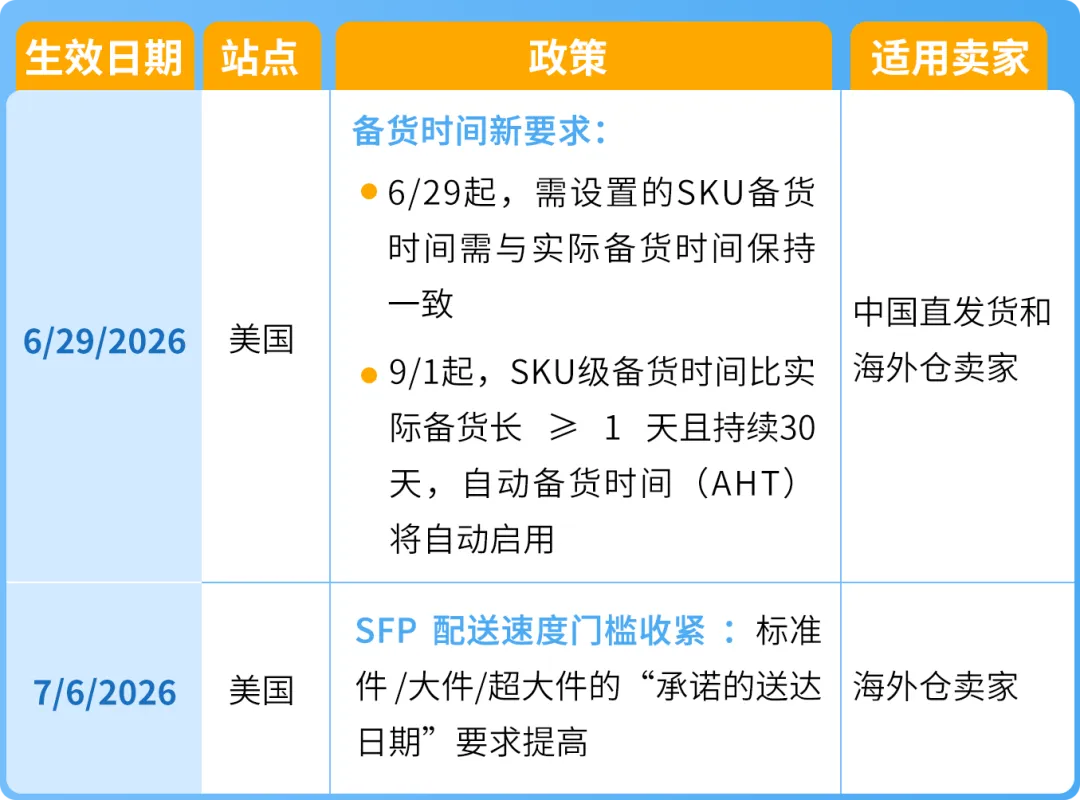
Applicable Sites: United States (Effective June 29)

Fast and accurate delivery can win buyers' trust and is a key factor affecting purchase decisions. Amazon data shows that for every day the promised delivery time is shortened, the average sales volume can increase by 5%.
Starting from June 29, 2026, you must set accurate preparation times for self-fulfilled seller SKUs, that is, the actual shipping speed of each SKU must be consistent with the set preparation time. Not applicable to: customized, handicraft, heavy and large items, etc.
Starting from September 1, 2026, Amazon will compare the preparation time you set for each SKU with your actual preparation time in the past 30 days. If the preparation time set for a SKU is one day or more longer than your actual performance and this continues for more than 30 days, Amazon will enable the "Automated Handling Time" (AHT) feature for that SKU, so that you can easily provide faster and more realistic delivery time commitments.

◆Method 1 (Recommended): Enable Automated Handling Time (AHT). AHT will set the preparation time for SKUs based on your recent shipping history and provide Late Shipment Rate (LSR) protection.
◆Method 2: You can also manually set the preparation time at the SKU level, as long as it is accurate, that is, the difference between the set and actual time is less than 1 day.

Applicable Sites: United States (Sellers using SFP)
Starting from July 6, 2026, Amazon will update the delivery speed metric requirements for Seller Fulfilled Prime (SFP). These updates ensure that the Prime label always represents the fast and reliable delivery that buyers trust, making your products more attractive.
To continue to maintain SFP eligibility, the page views of your Prime products must meet the following updated delivery speed percentages:
▍Standard Items:40% of Prime product detail page views must show a delivery date within 1 day (old metric 30%), 75% must show within 2 days (old metric 70%), and 90% must show within 5 days.
▍Oversize Items:15% of Prime product detail page views must show delivery within 1 day (old metric 10%), and 80% must show within 5 days.
▍Extra Large Items:25% of Prime product detail page views must show delivery within 2 days (old metric 15%), and 60% must show within 5 days.
If you have already met the above updated thresholds, no action is required. The rest of the SFP performance requirements remain unchanged.

Amazon is developing a new tool "Customize Your Delivery Settings" (expected to launch in September), which allows you to set faster delivery speeds with your own carrier agreements - you can set shipping deadlines, weekend shipping capabilities, and order cut-off times by delivery zip code, which will be used to generate delivery commitments displayed to buyers.
Weekend Transition Protection: Considering that it is difficult to fulfill orders on weekends before the tool is launched,weekends before October 17, 2026 will not be included in the speed metric assessment to facilitate your adaptation to the new requirements. During the transition period, you still need to fulfill orders on weekends according to SFP performance requirements.

Automated Handling Time (AHT) automatically sets the preparation time and order processing capacity for each SKU based on the historical performance of each SKU, eliminating the need to estimate and manually configure preparation times. Automated Handling Time helps reduce unnecessary longer preparation times (called "preparation time differences"), thereby increasing the attractiveness of your delivery dates to buyers and extending the preparation time for products whose actual preparation time is longer than the manually set preparation time, thus avoiding delayed shipments. In addition, after enabling AHT, even if your late shipment rate does not meet performance requirements, your self-fulfilled products will not be suspended due to the late shipment rate.
Please follow the steps below to update the automatic setting of preparation time:
◆Go to [Settings] on the seller platform, select [Delivery Settings], and then select [General Delivery Settings]
◆Scroll down to [Preparation Time] and click [Edit]
◆Select [Automatically Set Preparation Time] and click [Save]
◆Alternatively, you can also enter your order processing capacity and then click Save. For more information, see Modify Order Processing Capacity. This allows you to set a limit on the number of orders that can be processed within the default preparation time to avoid affecting your Late Shipment Rate (LSR) metric. When you receive too many orders, an extra day of preparation time will be added to all orders that exceed the set capacity, thereby applying order processing capacity. For more information about the Late Shipment Rate, see Late Shipment Rate. For more information about order processing capacity, see Delivery Settings

Note: You can enable the automatic setting of preparation time once every 24 hours. Changes may take up to 24 hours to take effect.
If you have any questions about Amazon, you canuse the link ( https://wsurl.cc/wg4chn) or scan the codeto contact the official customer development manager: