 Yamasen Cross-border
A bundle is a set of two or more complementary products that offers buyers great value and convenience. A bundle includes a main item (typically the highest-priced item in the bundle) and one or more additional items that enhance its use. Bundles do not include multipacks, which consist of two or more identical items.
Starting September 30, 2026, Amazon will extend the product bundle policy requirements to most categories. Product bundles in all categories must now be in the original manufacturer or brand packaging configuration. This requirement has applied to consumer product categories since late 2024 and ensures that all bundled items are authentic and safe to use and consume, increasing buyer confidence in purchase decisions.
Starting September 30, 2026, non-compliant bundle listings may be suppressed. If your products are identified as non-compliant, you will be notified by email and through the Product Listing Policy Violations in your Account Health dashboard. You may sell through non-compliant inventory by September 30, 2026, or choose to remove it from fulfillment centers.
Exceptions to this policy include: gift baskets listed in the gift category node, camera bundles listed in the Camera product type, and bundles with a valid letter of authorization from the brand owner or manufacturer. If your bundle qualifies for an exception, after a non-compliance is detected, you can submit the letter of authorization through the Account Health dashboard.
All items in a bundle must be allowed to sell on Amazon and comply with Amazon's selling policies. They must be branded and categorized according to the main item, and may only contain items in the same condition (do not mix new and used items). Bundles must comply with Amazon Marketplace Fair Pricing Policy.
Two types of bundles can be listed and sold on Amazon:
Hard bundle: This type of bundle is packaged together as a single physical item and has a unique external identifier (such as UPC or EAN), or the main item brand may qualify for GTIN exemption. Amazon only allows listing hard bundles that are packaged by the original manufacturer or brand, with some exceptions (see below).
For example, you may list a Dawn dish spray and dish spray refill bundle that is originally packaged by Dawn and has its own product identifier. However, you cannot create your own hard bundle consisting of Dawn dish spray and a refill provided by Dawn or another brand.
Hard bundles must be received as a whole when returned. The selling fee for the main item's category applies to all items in the bundle, and component items cannot be changed after creation.
Virtual bundle: This type of bundle is not packaged together as a single physical item and does not have a unique identifier. Unlike hard bundles, it is not necessarily created by the manufacturer or brand, and any selling partner who is eligible to sell each individual item in the bundle may list it.
For example, you may list Dawn dish spray and a refill as a virtual bundle, provided you are eligible to sell each item in it.
The following lists exceptions to the hard bundle rules by category. You must be eligible to sell (that is, able to sell on Amazon) all items in the bundle.
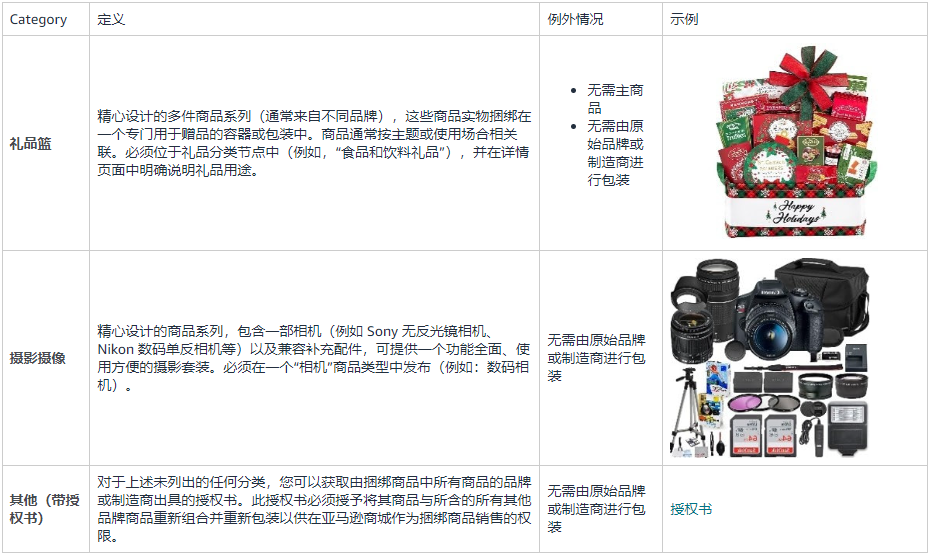
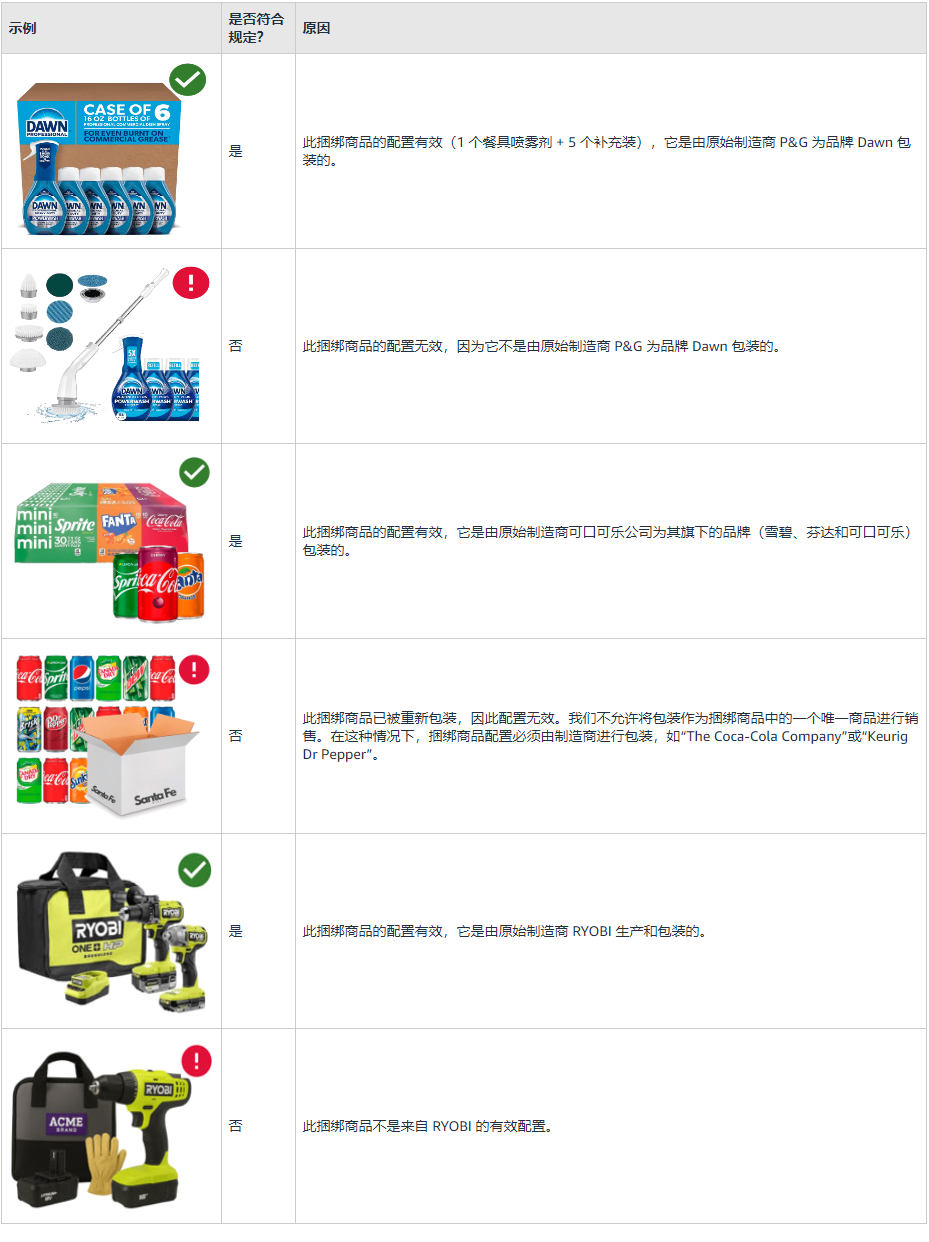
Hard bundles
You can create hard bundles using standard listing tools, just as you would create a single ASIN. The bundle must have a unique external product identifier (such as UPC or EAN), or the main brand may qualify for GTIN exemption.
Hard bundles can be created in all Amazon marketplaces worldwide.
Virtual bundles
First, ensure all items are available for individual purchase, or create them using Amazon's standard listing tools.
To create a bundle, go to the Virtual Bundle tool and follow these steps:
Click [Add products], search or browse for your main item, and then click [Add to bundle].
Repeat this process for other complementary products.
Add bundle details, then click [Save and publish] to submit.
Note:
The virtual bundle option may not yet be enabled for your marketplace, brand, or fulfillment channel combination.
Virtual bundles cannot be created or edited using inventory file templates or APIs.
The following listing requirements apply to both types of bundles:
The bundle's product title must include the word "bundle" and comply with Amazon's standard title requirements.
The bundle's product description must clearly state that the product is a bundle and identify all included items.
The first bullet point on the bundle detail page must state that the product is a bundle of "X" items and must identify each item in the bundle.
The main image for the bundle must show all items in the bundle and cannot include any items not part of the bundle.
The above content is sourced from Amazon.