
 Cross-border E-commerce Excellent Craftsman School
Early this morning, many Amazon sellers suddenly received tax data emails from the platform, stating "We have submitted the first quarterly report for July to September 2025, which includes your identity information, number of transactions, income, and commission and service fees," along with a detailed quarterly income data table.
("Download your report" suggests that sellers should download and save it as soon as possible)

Data source: Amazon
The data includes seller marks, sites, company names, unified social credit codes/taxpayer identification numbers, quarters, total income, refund amounts, net income, total commission and service fees paid to the platform, and the number of transactions (orders).

Data source: Amazon
However, when sellers checked the specific data, they found that something was wrong. The income figures in the report did not match their backend statistical data, and the difference was significant. "No matter how I calculate it, it doesn't match the backend data," a seller asked in the group. What's more confusing is that the income data in these tax reports seems not to include advertising fees and warehousing fees.
According to current seller feedback, there are mainly two problems:
1. The data does not match, it does not match the sales amount of the backend report, among which major items such as promotion fees, warehousing fees, and advertising fees are not included;
2. Exchange rate issues, the exchange rate used by Amazon in tax reports is significantly higher than the market exchange rate, some sellers calculated The exchange rate is as high as 7.6, and even closer to 7.9.
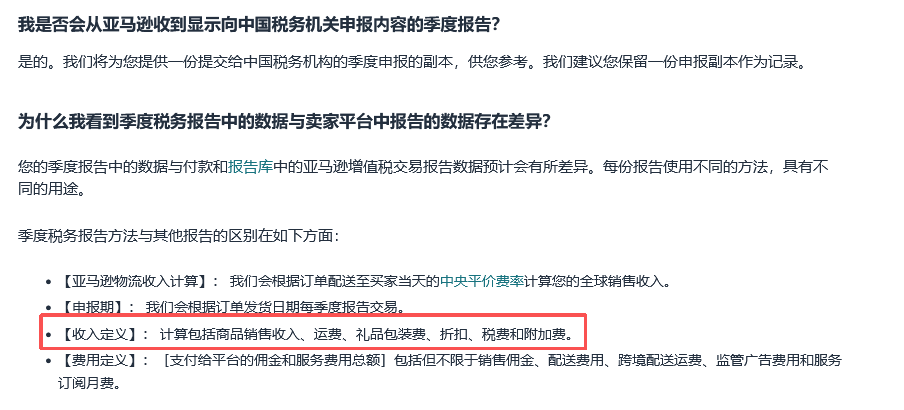
According to relevant personnel's data reverse calculation and estimation, it is concluded that Amazon's total income push logic is: Pushed Income ≈ Sales Revenue + VAT/Consumption Tax, which means that it is not only net sales but also includes taxes collected and paid on behalf. Therefore, the possible data push logic is the concept of "tax-inclusive price", which leads to large data differences.
Data source: Amazon
Faced with the data differences in Amazon's tax reports, how should sellers deal with them?
1. Immediately conduct data calculation, divide the total amount of RMB pushed by Amazon by the sum of your actual sales and taxes, and check whether the resulting exchange rate returns to the normal range. If there is still a slight difference, check whether you have missed elements such as shipping fees or promotional discounts.
2. Next, sort out the accounts from the source of orders. Income, cost, expense, tax, each item must be clear. Especially good price-tax separation - in the accounting system, clearly distinguish between tax-excluded income and taxes collected and paid on behalf.
Of course, if the actual sales amount generated on Amazon is different from the data reported by the platform to the tax bureau, sellers can also prepare relevant data materials, backend reports, etc., and then go to the tax bureau for correction.