 Amazon Global Store opening
Every year during Prime Day, some sellers miss sales opportunities because they are "one step behind": the goods are still in transit, and the event has already started. Logistics preparation is not about speed, but about timing. When to stock up, when to ship, and when to arrive at the warehouse, each step has a window period, and once it's past, it's gone.
This article helps you break down the rhythm of logistics preparation during the peak season: where to check key dates, how to reverse-engineer your shipping plan, and what to do at each stage. It is recommended to save it for future reference.

As Prime Day approaches, Amazon's Warehouse Distribution Network (AWD) and Fulfillment by Amazon (FBA) warehouse entry deadlines have been announced!
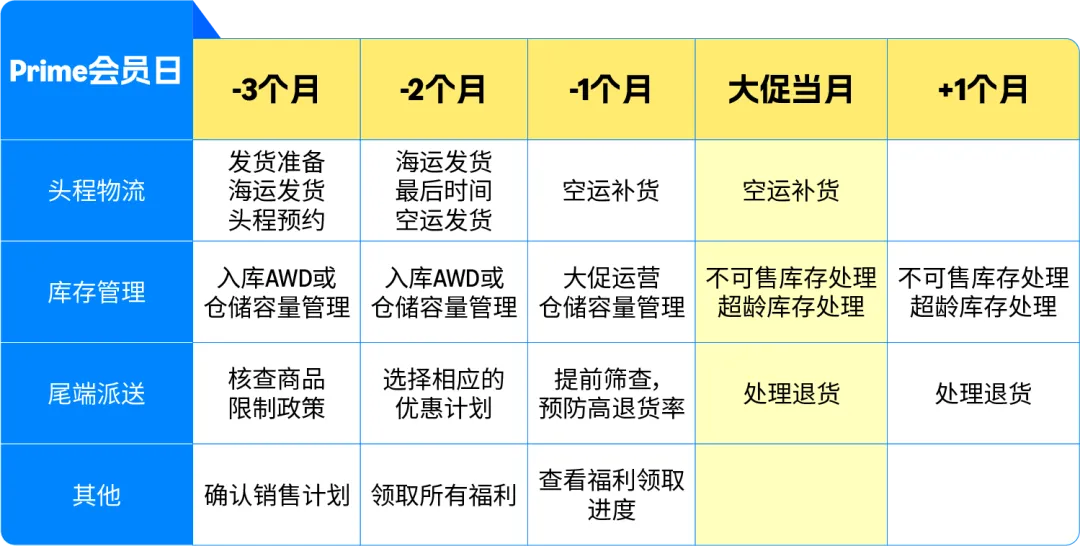

During major promotions, the speed of delivery affects whether buyers place orders. Using FBA for shipping ensures faster fulfillment, lower costs, and the ability to handle orders. For FBA sellers, it is recommended to focus on the following aspects to grasp the shipping rhythm.
◆Arrange transportation in advance
You need toconsult with logistics providers or freight forwarders in advance to understand the latest delivery times and freight rates. Based on your actual situation and changes in delivery times, plan your shipments/replenishment in advance, book shipping schedules/space in advance, and try to reserve more transportation time.
◆ Book warehouse entry in advance
Air and sea freight warehouse entries require advance booking. It is recommended that youchoose a logistics company that is more familiar with the FBA warehouse entry process. Less-than-truckload freight trucks and container trucks require longer waiting times to queue for warehouse entry.
◆ "Sea Plus Dispatch" or "Air Plus Dispatch"
The delivery method of "Sea Plus Dispatch" or "Air Plus Dispatch" means thatthe last-mile delivery in the destination country uses express delivery for warehouse entry. Please have your contracted logistics provider provide the tracking number of the last-mile express delivery in a timely manner and upload it to the seller platform. At the same time, you can also choose Amazon's cooperative carrier in the destination country to transport your goods into the warehouse.
◆ Get the option to waive the warehouse entry configuration fee
To obtain "Amazon-optimized shipment splitting" to waive the warehouse entry configuration service fee, please ensure that your shipment meets the following two conditions:
◇ Each item (SKU) must contain at least 5 identical cartons or pallets
◇ Each carton or pallet must contain the same combination of goods, and the quantity of each item in each carton or pallet must also be the same
◆ Improve sorting efficiency and earn delivery fee discounts
Amazon's European site has launched the "Amazon Recommended Packaging Method" feature, which can intelligently tell FBA sellers "how to pack more cost-effectively," optimize inventory distribution, and earn delivery fee discounts! To meet the "Amazon Recommended Packaging Method," ensure that the total shipment quantity is at least 35 pieces, and each box does not exceed 15 kilograms.
◆ Batch warehouse entry to AWD
Batch warehouse entry to AWD, enable automatic replenishment mode, avoid warehouse overflow and stockouts.AWD is not subject to warehouse capacity restrictions, and products entered into AWD can be searched and purchased, saving trouble and preventing stockouts, reducing costs through batch storage. Effectively avoid warehouse overflow and stockouts during peak seasons!
◆ Use faster transportation methods
Express delivery warehouse entry (such as UPS, DHL Express, FedEx) does not require warehouse entry booking, which can ensure that the seller's goods are quickly and timely entered into the warehouse, and avoid missing peak season hot sales due to long waiting times.
*Please ensure that you select "Small parcel delivery (SPD)" and the correct international express company name during the process of creating a shipment on the seller platform.

Amazon recommends that you pay attention to the following inventory management points during the current peak period:
① Check warehouse capacity and avoid warehouse entry issues by releasing warehouse capacity or applying for additional capacity:
Release warehouse capacity
If your ASIN already has overdue inventory in the FBA warehouse,please stop sending the ASIN goods to the FBA warehouse, and at the same timeclean up the inventory in the warehouse as soon as possible to free up space for other best-selling goods. Or you canship to the AWD warehouse, and replenish to FBA automatically/manually through AWD, which has no warehouse capacity restrictions.
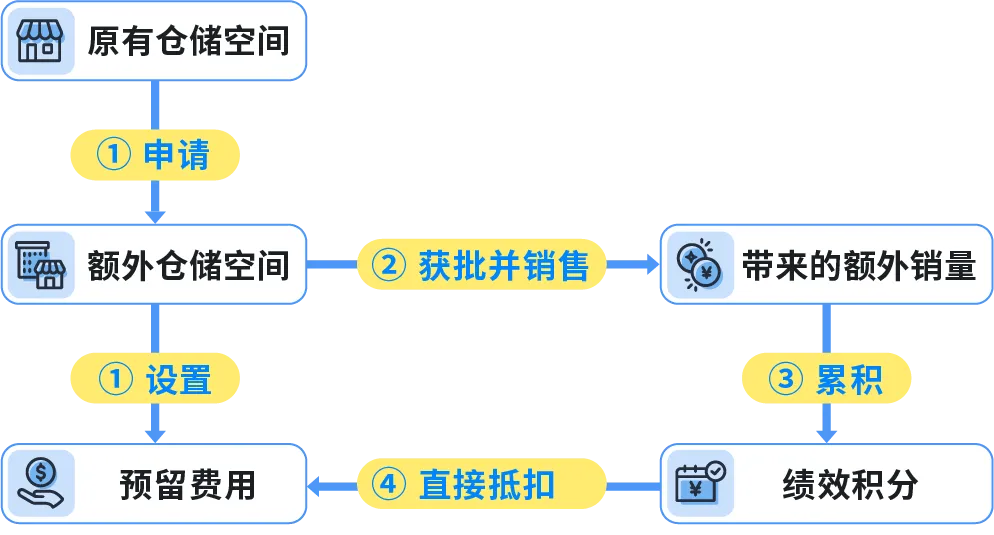
Apply for additional warehouse space: Increase peak season sales potential
If sellers want to increase warehouse space for incoming goods and believe that these goods will be popular with buyers, they can apply for additional warehouse space throughWarehouse Capacity Manager to improve their sales performance during the peak season.
② Handle different types of inventory:
Essential inventory: Directly enter the warehouse FBA
On the [Amazon Logistics Inventory] page on the seller platform, you can viewthe recommended minimum FBA inventory levels and replenishment recommendations, combined with demand forecasts and your warehouse capacity, prioritize replenishment for products with the most potential in peak season sales.
Long-term solution: Prioritize warehouse entry AWD
To avoid stockouts during peak seasons, it is recommended that you have sufficient safety stock in the sales destination country, so that you can replenish in time.
If you are a US seller, Amazon recommends usingthe lower-cost storage solution, i.e. AWD, which does not increase prices during peak seasons, and has 80% lower storage fees than FBA during the same period, and is not subject to warehouse capacity restrictions.
At the same time,AWD's automatic replenishment functiondynamically adjusts the replenishment rhythm to FBA, allowing you to focus on your business without the pressure of inventory management! Currently, AWD supports small parcel express warehouse entry.
③ Check for product restrictions:
Check whether the product complies with Amazon Logistics (FBA) product restriction policy, which is the most basic and important. Sellers must check before preparing for warehouse entry to avoid situations such as Amazon operation centers rejecting goods, discarding goods, or returning goods. The product restriction policy mainly targets embargoed goods and dangerous goods.
× Embargoed goods: FBA embargoed goods have different requirements at each site. Before creating Amazon Logistics products, please understand which products are suitable for FBA delivery.
▲ Dangerous goods: If Amazon confirms that the received goods are undeliverable dangerous goods, they may discard such goods, and the seller will bear the cost of discarding, and Amazon will not compensate the seller.