
 Amazon Global Store opening
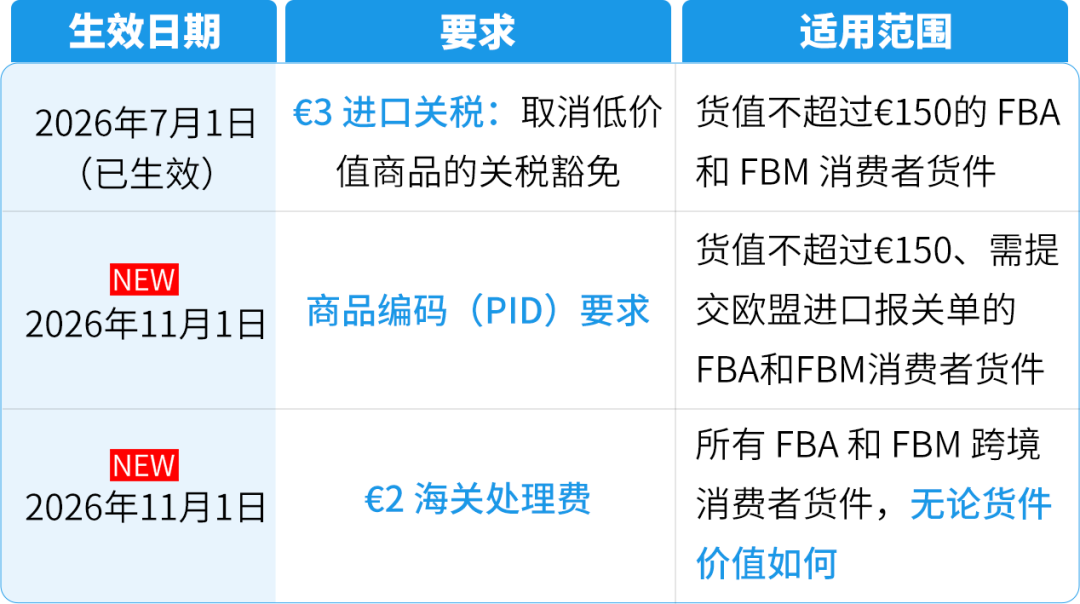
From 1 November 2026, the EU adds two requirements for cross-border shipments sent directly from outside the EU to EU consumers. FBA and FBM sellers must act:
- €2 customs handling fee on every cross-border item, regardless of value.
- Product Identifier (PID) required in declarations for shipments up to €150.
Missing or invalid PID may cause declarations to be rejected and affect your ability to sell those items in the EU. Update your catalogue promptly.

The EU is tightening customs management for B2C imports sold directly to EU consumers and shipped from outside the EU. If you ship from the UK, China, the US or any non-EU country/region directly to EU consumers, these rules apply whether you use FBA or FBM.
Not affected: shipments from within the EU to EU consumers are not subject to the €3 import duty or the €2 handling fee (other import charges may apply).
Summary: the €3 duty from 1 July continues; from 1 November, add €2 per item. For shipments up to €150, prepare PID data.
From 1 November 2026, EU import declarations for B2C shipments up to €150 must include the required PID. This applies to FBM and FBA shipments requiring an EU import declaration.

Ensure your carrier receives these product identifiers for clearance:
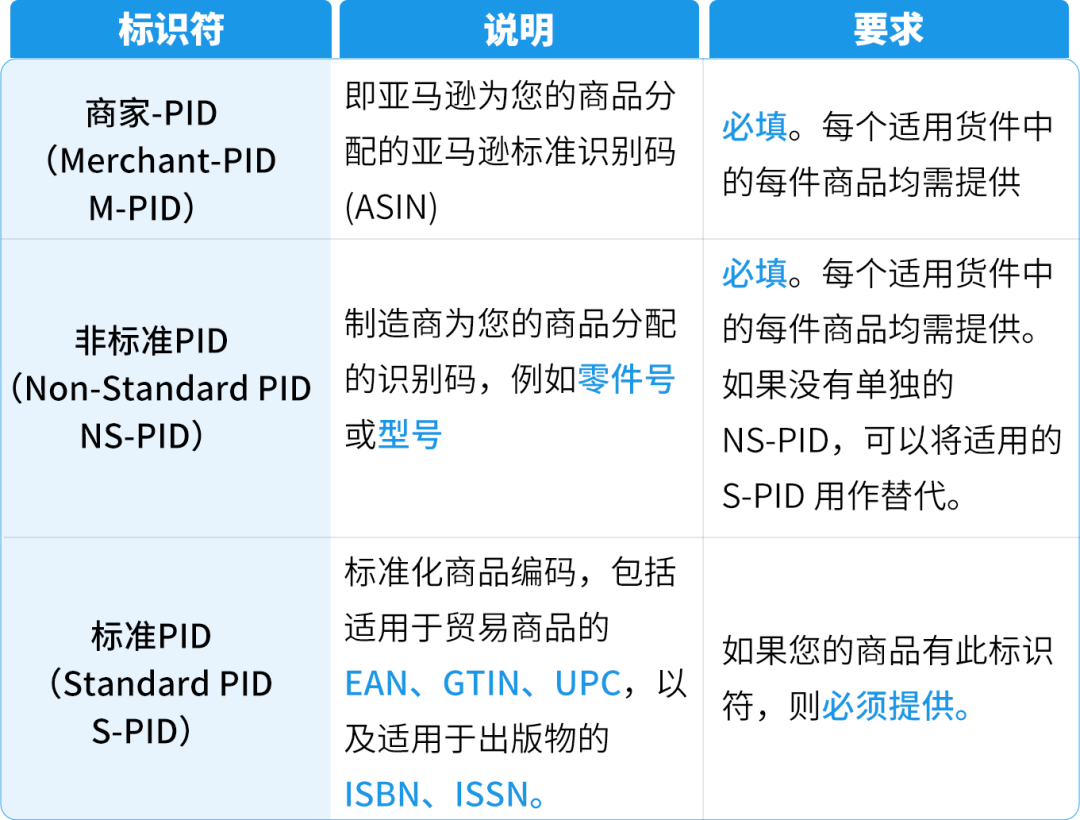

For shipments up to €150 from outside the EU to EU customers, provide the PID for each item to the carrier, plus all other clearance data.
Using Buy Shipping: enter the product identifier when buying the label; Amazon will pass it with the Amazon IOSS number. ⚠️ Even if identifiers already exist in your listing, enter them in Buy Shipping. From 1 November, enter a part number or model number for each item, or label purchase will fail.
Not using Buy Shipping: send this information directly to your carrier and confirm their preferred method.

For applicable FBA cross-border shipments, Amazon takes the product identifier from your catalogue. Ensure the required PID data in the Amazon catalogue is accurate and complete.
Note: If listings have no valid PID by 1 November 2026, cross-border orders may fail EU clearance, and your selling rights may be affected. See the practical guide below.

- No manufacturer part number or model: ask the manufacturer to assign one; if not possible, use a standard PID (S-PID) such as EAN, GTIN or UPC as a non-standard PID (NS-PID), per EU Commission guidance.
- Handmade/handicraft goods (HS 4420, 4602, 4802, 5702, 5804, 5805, 7013) are exempt from S-PID but still need a valid NS-PID for clearance.
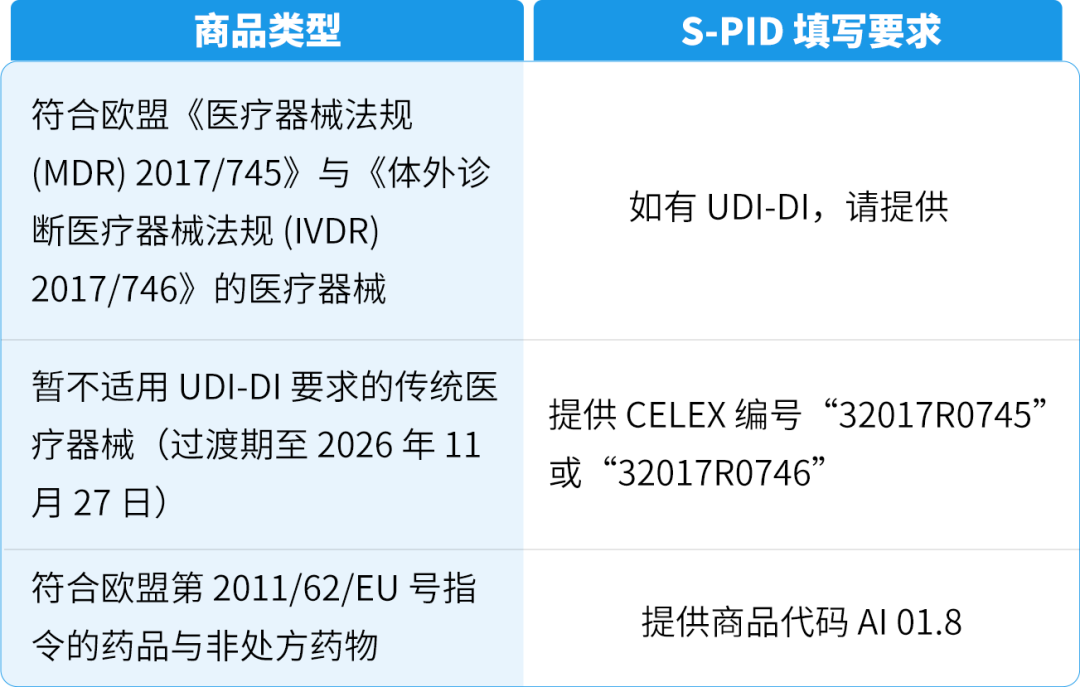
- Healthcare goods: see S-PID requirements.

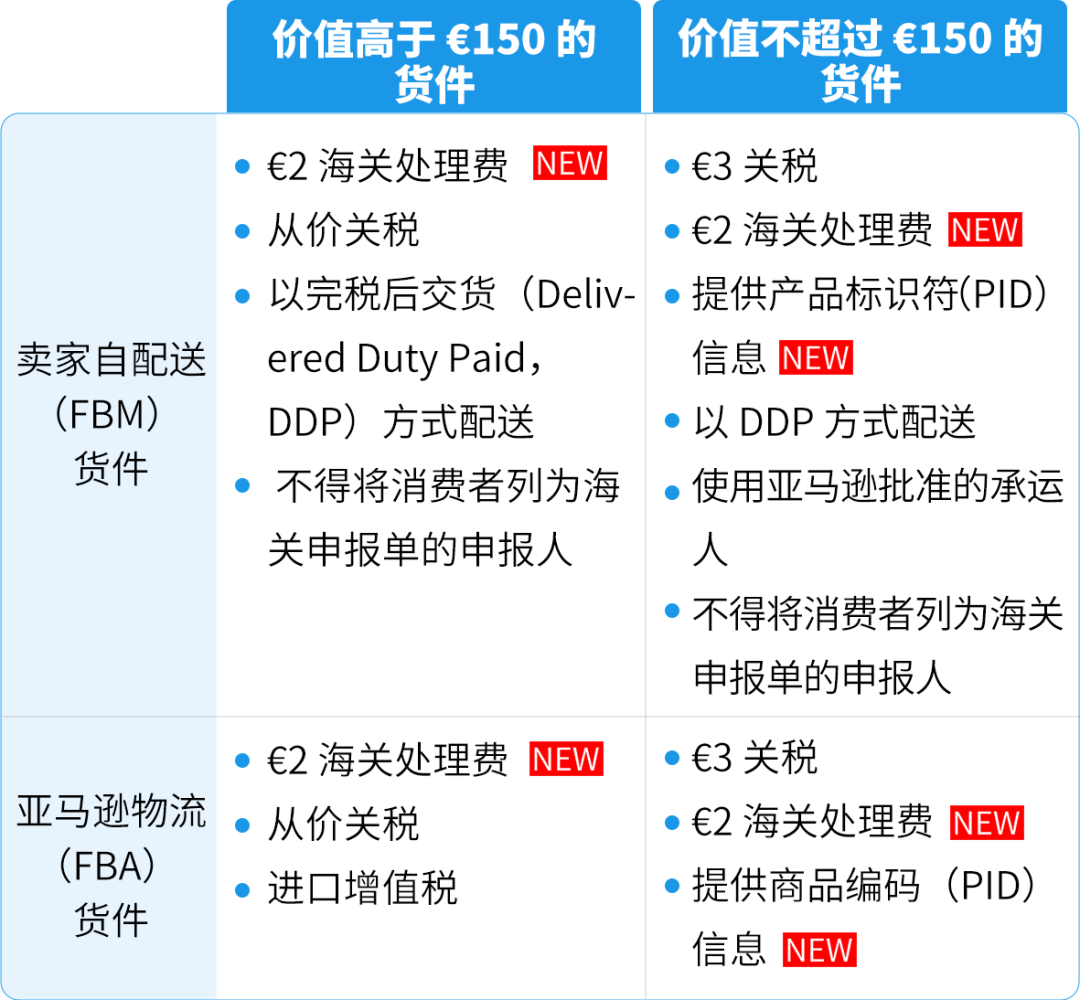
From 1 November 2026, all customer shipments sent directly from outside the EU to EU consumers, regardless of value, incur a €2 customs handling fee per item/tariff line. This applies to FBA and FBM customer shipments.
- The €2 fee does not replace the €3 duty; both apply. For shipments up to €150, each item pays both.
- The €2 fee is an EU customs rule fee, not an Amazon fee. See EU Regulation (EU) 2026/2108 and Commission Delegated Regulation (EU) 2026/2152.

- Fee payment: the authorised carrier bills you and pays EU customs; you pay the carrier.
- Do not list the customer as declarant: FBM declarations must not list the consumer as declarant. If they do and customs checks, the declaration may be rejected and selling rights affected. This also conflicts with Amazon’s DDP policy.
- For FBM shipments above €150, do not list Amazon as declarant; Amazon is not the declarant.

Recommended: use the Category Listings Report (CLR) for batch updates, or update listings individually.

CLR is marketplace-specific, so download it separately for each marketplace where you sell.
To download: Seller Central → Reports → Inventory Reports → Category Listings Report. Leave “Listings created after” blank, set status filter to “All”, click “Request Report”, then download when completed.

Open each file’s “Template” tab and check “Product ID”, “Part Number” and “Model” columns. Add missing values; only UPC/EAN/GTIN can be used as S-PID. Select “Edit (Partial Update)” in the “Listing Action” column before saving, then upload via Catalogue → Bulk Upload Products. Repeat and verify by regenerating the CLR.

For single listings: Catalogue → Manage Inventory → three-dot button → Edit listing → Product Identity. Add UPC/EAN/GTIN under “External Product ID”, then add model or part number under Product Details and save.

The 1 November requirements are added to the 1 July rules, which remain in effect.

From 1 July 2026, shipments up to €150 are subject to a €3 duty per item/tariff line. This applies to FBA and FBM cross-border customer shipments and is an EU customs fee, not an Amazon fee.

- Up to €150: use an Amazon-approved carrier authorised to clear under Amazon’s IOSS number. Free-text carrier entry has been removed; select an approved carrier or the shipment cannot be confirmed, including via API.
- Above €150: continue existing carrier arrangements, but provide clearance information.
- All values: deliver DDP and provide carriers with all clearance data and documents.
Confirming FBM shipments from outside the EU: Manage Orders → Confirm shipment → select non-EU warehouse → choose an approved carrier → enter tracking → confirm. Give the carrier Amazon’s IOSS number and the ASIN for each item. From 1 November, also provide PID for shipments up to €150.

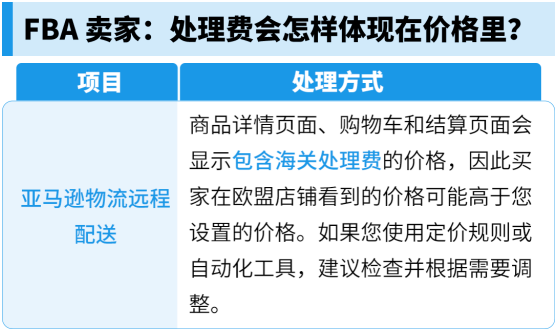
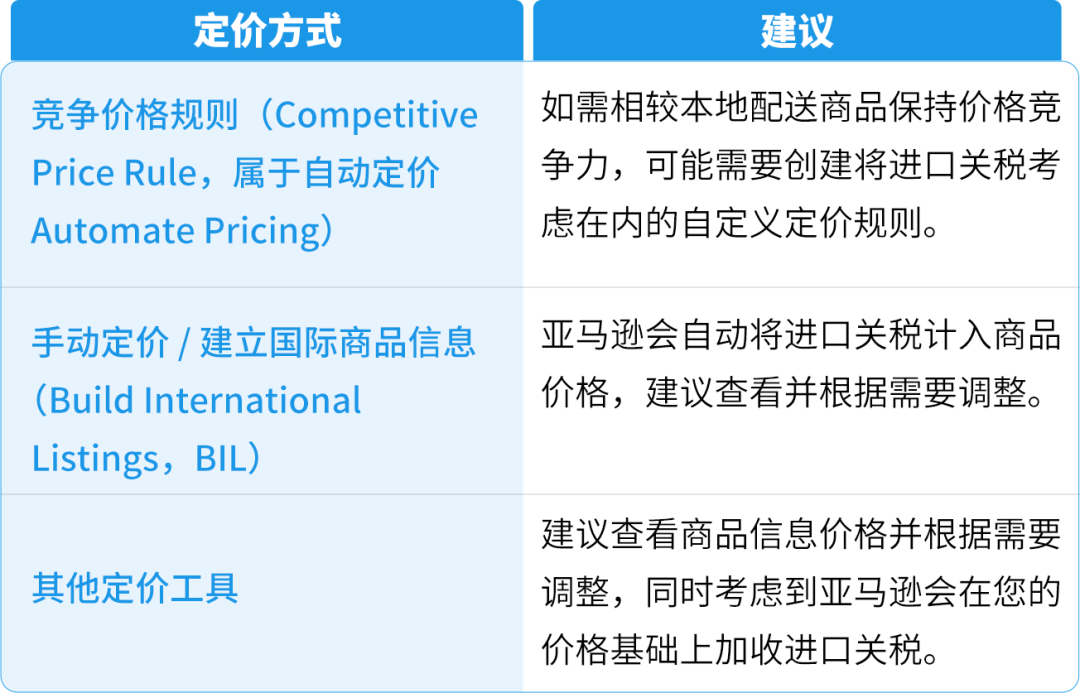
For Remote Fulfilment with FBA, shipments up to €150 include the €3 duty in the customer-facing price; Seller Central prices exclude import duty/VAT.

Intra-EU shipments avoid these fees and deliver faster. Consider cross-listing in EU stores or using Pan-European FBA/European Fulfilment Network. Storing inventory in the EU may require VAT registration; Amazon offers support.
After 1 November, missing PID data may directly cause declarations to be rejected and items to become unsellable across borders. FBA sellers should complete catalogue PID data; FBM sellers should align PID transmission, handling-fee settlement and declarant information with carriers. Download the Category Listings Report today and check best-selling items first.
If you have questions about Amazon, use the link (https://wsurl.cc/wg4chn) or scan the code to contact an official client development manager: