 Amazon Global Store opening
Sales are rising, but don't overlook how fast inventory is being consumed:

To capture peak-season orders, you need both enough stock and timely delivery!
Especially as inbound lead times have fluctuated recently, you need to allow enough time from shipping to inbound and then to becoming available.
Now recheck your restocking plan based on the latest sales! This Europe peak-season restocking guide starts with inventory checks, organized by "not yet shipped, in transit, delivered to fulfillment center" action points, to help you identify stockout risks in advance and prepare for peak sales.
Recent ocean shipping has been affected by typhoons, vessel schedules, ports, customs clearance, and final delivery, combined with strikes and congestion at some European ports. Overall transit time from China to Amazon fulfillment center receiving has slowed.
Be sure to monitor recent inbound logistics fluctuations, seize the final restocking window, and check the following two things immediately.

Refer to the "Recommended minimum inventory level" on the "FBA Inventory" page in Seller Central and the sales forecast, and add 1–2 weeks of safety stock on top of your original plan to cope with inbound lead time fluctuations.
🔺 Please note: restocking also has benefits! Check whether you have received a TIPS invitation.
When checking inventory, also remember to look at the top of the "FBA Inventory" page to confirm whether you have received a peak-season inventory incentive invitation. Eligible sellers on the US, Canada, Europe, and Japan sites may participate in the Target Inventory for Peak Success (TIPS) program.
The program is invitation-only. Eligible sellers, after logging in to the "FBA Inventory" page, will see a prompt at the top: "We invite you to participate in the Target Inventory for Peak Success (TIPS) program." Follow the prompt to download the report and view inventory targets. After meeting the targets, you can enjoy benefits such as peak storage fee discounts.

Expected inbound peak is from the last week of October to November:
Shipments not yet shipped: Prioritize air freight or international express to arrive before the peak.
Inventory already in overseas warehouses: Arrange FBA inbound now to avoid the inbound peak.
🔺 Reminder: Europe has multiple sites, and inbound cutoff times differ by site. Log in to Seller Central and carefully check the requirements for the corresponding site.

Inventory levels affect not only whether you have products to sell, but also the delivery speed shown to consumers. Amazon data shows that products displaying Same-Day/Next-Day delivery badges see an average sales lift of about 20%.
When inventory is sufficient, Amazon can transfer products to more fulfillment centers in different regions. When inventory drops to low levels, even if not completely out of stock, the inventory available for transfer decreases. Some consumers may be matched with inventory located farther away, affecting delivery speed and purchase decisions.
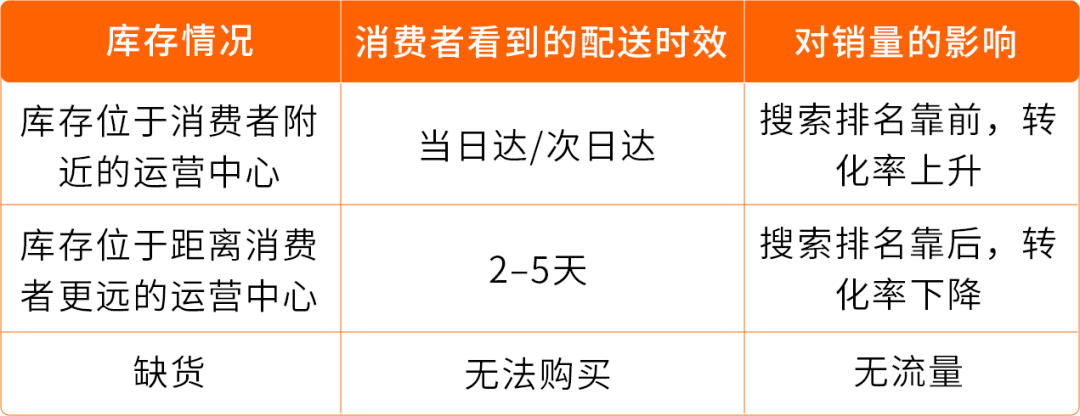
Therefore, focus on checking the sellable weeks for promotional products, top ASINs, and low-stock products. During the peak season, it is recommended that promotional products and top ASINs maintain more than 8 weeks of inventory to support distribution to more regional fulfillment centers and let more consumers see the "Same-Day" badge. Don't wait until you run out of stock to restock. Maintaining a healthy inventory level is also early preparation for peak-season sales.

The closer to the peak season, the fewer adjustments sellers can make. Check key steps by shipment status to reduce the risk of delays in customs clearance, appointments, receiving, and listing.


Prioritize sending products already enrolled in Deals or promotions, top ASINs by sales volume or revenue, and products that are already out of stock or below the minimum inventory level. Products for which consumers care more about delivery speed should also be prioritized.
For critical inventory that is already prepared, prioritize air freight; for small-volume and urgent replenishment, consider international express.

If capacity limits prevent you from shipping, immediately clear aged and excess inventory, and apply for additional capacity through Capacity Manager.
For most ASINs that are low stock, out of stock, or about to participate in promotions, Amazon automatically waives two weeks of FBA capacity limits, and you can create shipments for exempted ASINs.
For low-stock or out-of-stock situations, check the labels on the "FBA Inventory" page.

Verify the assigned inbound address, contents and quantities, weight, labels, tracking ID, and expected delivery window to avoid inconsistent information that may affect receiving.

Consider Amazon official air freight products such as Amazon Global Logistics (AGL), Amazon SEND, and FBA Inbound Shipment Tracking (FIST).
For AGL and Amazon SEND: after accurate ship dates are provided, the Delivery Window is automatically maintained by the carrier, and sellers can also manage it themselves.
For FIST carriers that have enabled DW Automation: delivery windows can be automatically managed and updated based on real-time shipment status, simplifying operations and improving estimated delivery window accuracy. There is also a smart transfer feature to minimize delays.


Confirm the latest arrival and delivery arrangements with your carrier. If the expected arrival time changes, update it in Seller Central in a timely manner. When using a carrier that supports DW Automation, confirm that the system has been updated according to actual progress.

Confirm that the tracking ID has been uploaded and accurately associated with the corresponding FBA box label. For ocean or air freight shipments with final delivery by express, obtain the final-mile tracking number from your logistics provider and upload it to Seller Central.

Check the appointment status in shipment tracking details, and contact the carrier promptly if the appointment is not completed. If the target fulfillment center is congested, confirm whether the carrier supports smart transfer and whether it applies to the current shipment. If you find that shipment information does not match reality, contact the carrier or Seller Support as soon as possible to confirm how to handle it.

"Delivered" or "Received" does not mean that the products are already sellable.
Continue to check receiving and listing progress. If the shipment shows "anomaly detected" or "outside the delivery window", handle it as soon as possible. If receiving quantities, product condition, or listing progress is abnormal, check the reason through Seller Central and contact Seller Support in a timely manner.
After listing, continue to check the inventory health of key products, and determine which products and quantities to replenish next based on actual sales velocity, restock suggestions, and demand forecasts.

Log in to the "FBA Inventory" page now to confirm whether you have enough stock and whether it can arrive on time, and don't forget to check whether you have received a TIPS invitation. Prepare in advance to capture the upcoming peak-season orders!
If you have any questions about Amazon, you can use the link (https://wsurl.cc/wg4chn) or scan the QR code to contact the official client development manager: