 Amazon Global Store opening
2026 Amazon Black Friday & Cyber Monday will begin in mid-to-late November across marketplaces; exact dates may vary by site.
2026 Amazon Black Friday & Cyber Monday Schedule
▶US & Canada:11/19–11/30
▶Australia:11/17–11/30
▶Saudi Arabia & UAE (White Friday):11/19–11/30 (11/19 is PEA member exclusive discount day)
▶Brazil:11/19–11/30 (warm-up: 11/3–11/18)
▶Mexico:11/26–11/30
▶Japan & Europe: check Seller Central promotions page and later official notices.
*Some sites: see official announcements.
We are now in the final preparation stage. This article summarizes current Deal submission reminders and key preparation points. Save it and add important dates to your phone/computer calendar.
Black Friday & Cyber Monday promotions are open for submission. Besides Lightning Deals and Z Deals, set Prime Exclusive Discounts and Coupons; European sellers can use one-click store expansion. Submit early.

To allow more time for quality promotions and maximize results, the US Lightning Deal/Z Deal submission deadline is extended to November 13, 2026.
Submissions are still open in other marketplaces:
◉ Canada:by Nov 13
◉ Europe:by Nov 18
◉ Japan:by Nov 25
*Japan sellers with submitted promotions should create replenishment shipments early.
◉ Middle East (UAE/Saudi Arabia):by Nov 19
US Sellers: Key Reminders
Set reminders for these dates:
◉ Nov 6:
If you have not submitted Black Friday/Cyber Monday Prime Exclusive Discounts, complete them before this date.
◉ Nov 13:
Last chance to submit US Black Friday/Cyber Monday Deals, and key window to resolve Deal Suppression.
◉ Nov 16:
If you find missing submissions, submit omitted Prime Exclusive Discounts before this date to allow time for corrections.
🔗Path: Seller Central → Marketing → Manage Promotions & Deals → Create Promotion
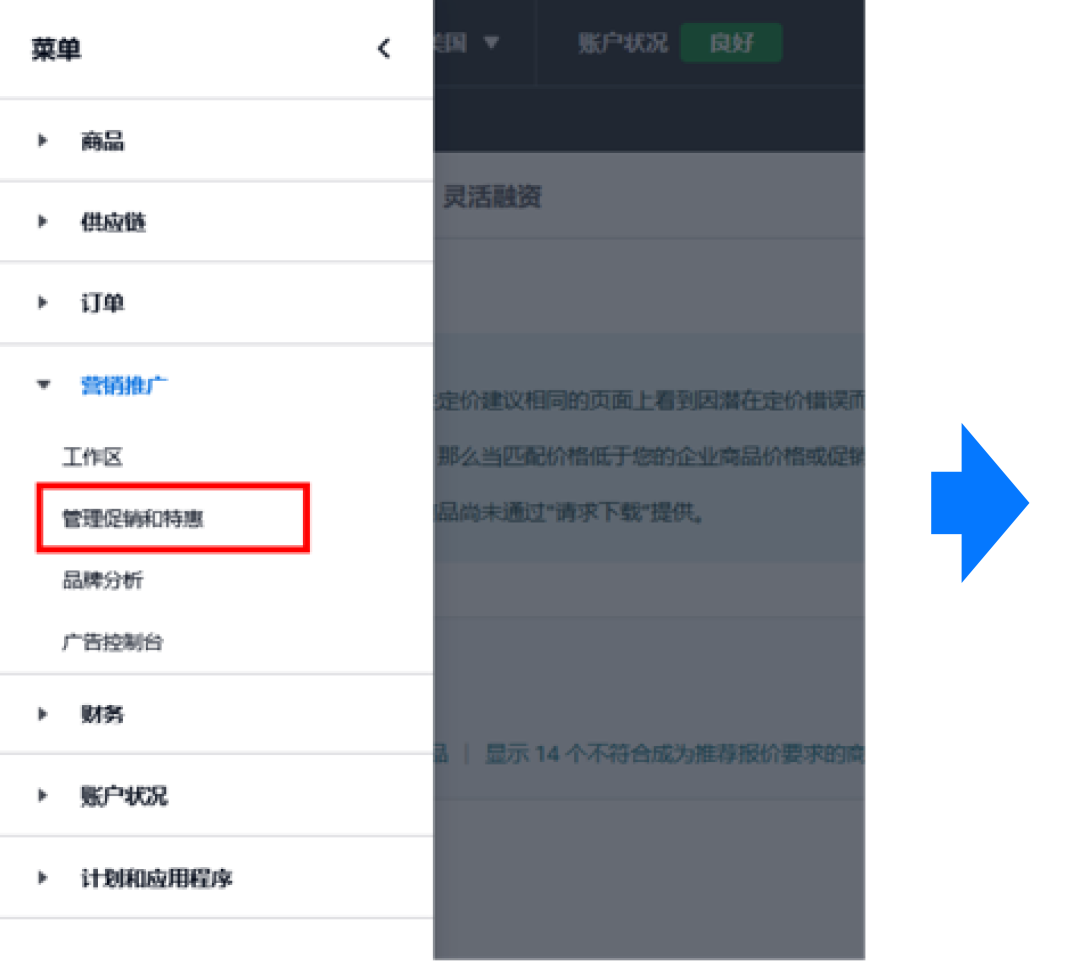
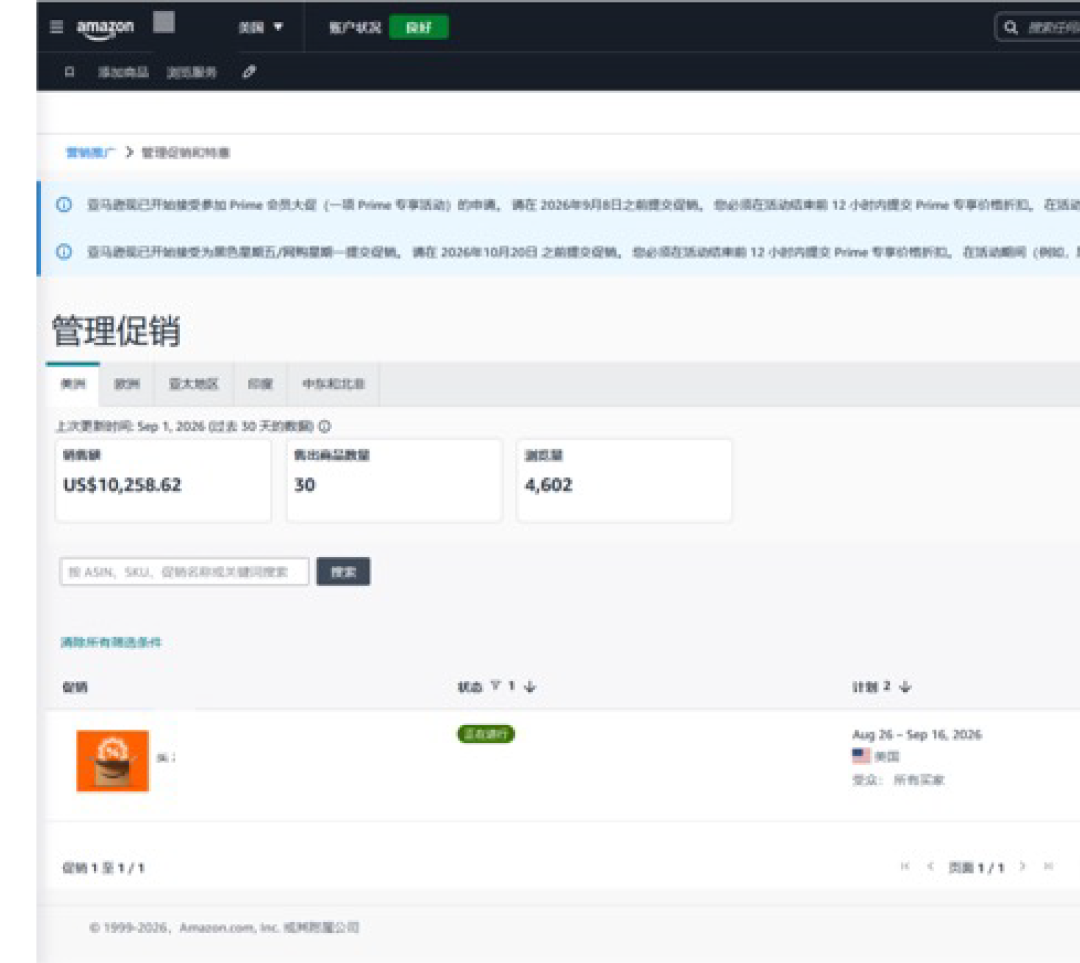
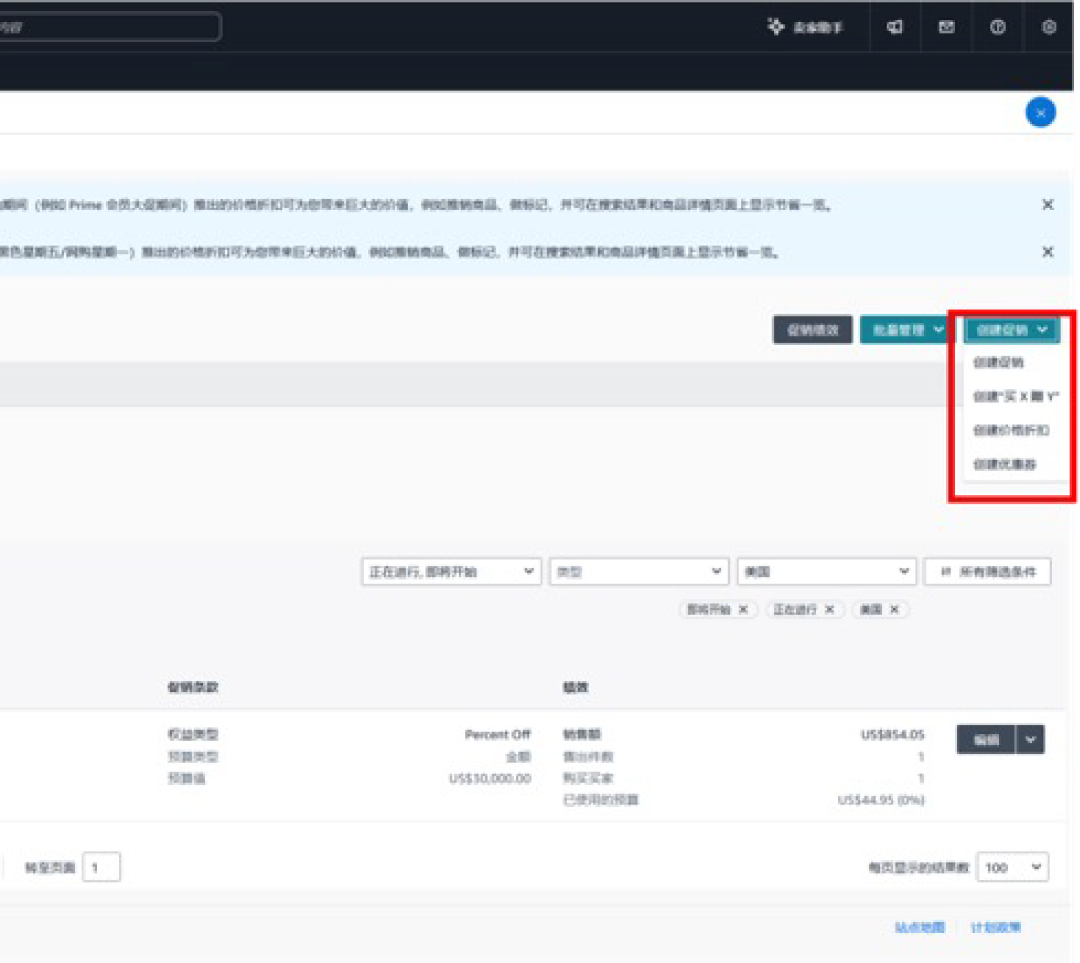
*Exact extension and covered sites are subject to each marketplace's Seller Central display.
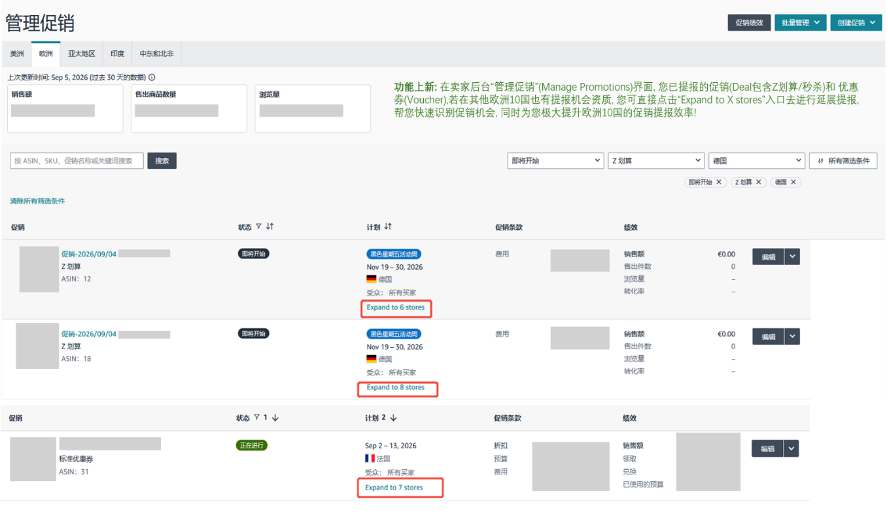
New Feature: Amazon Europe Promotion Expansion Upgrade
European sellers with submitted Deals can click “Expand to X stores” in the promotion management page to extend Deals or coupons to 10 European stores.
What if “Issues” appear after submission?
Follow the page guidance to fix and resubmit immediately to ensure normal display and uninterrupted traffic during the event.
🔍 Path: Seller Central → Marketing → Manage Promotions & Deals → Manage Promotions
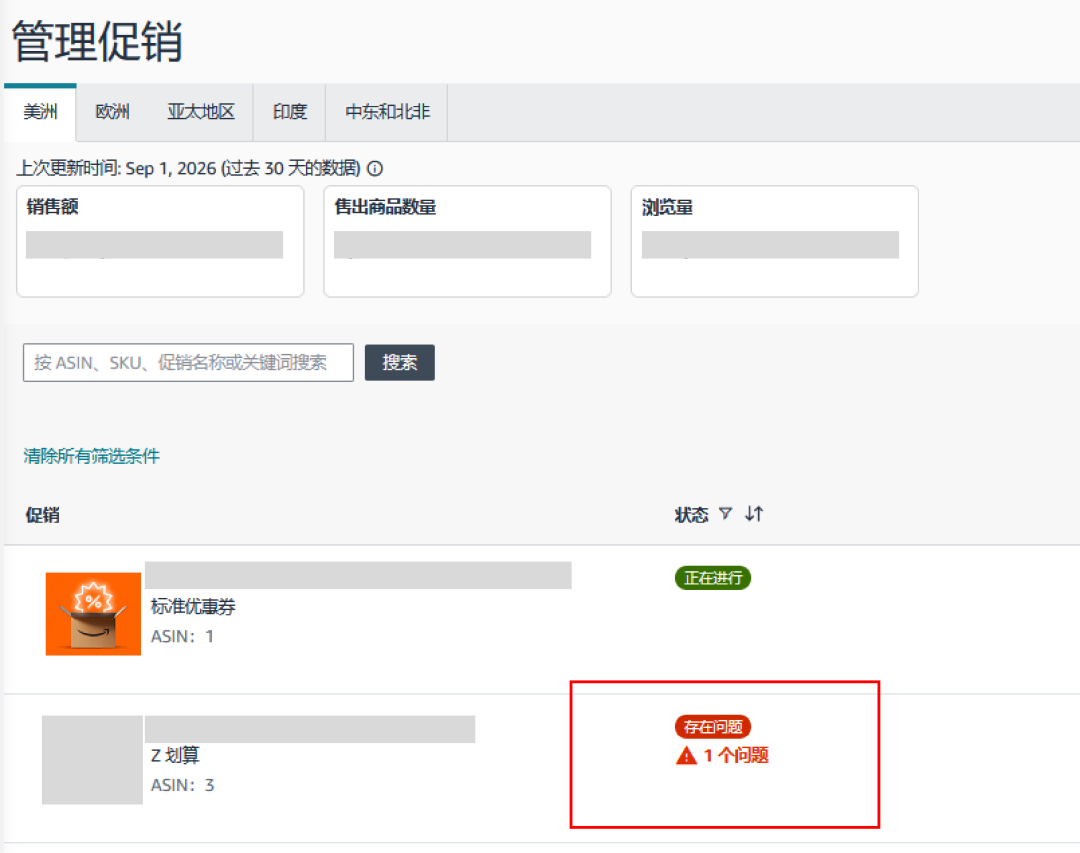
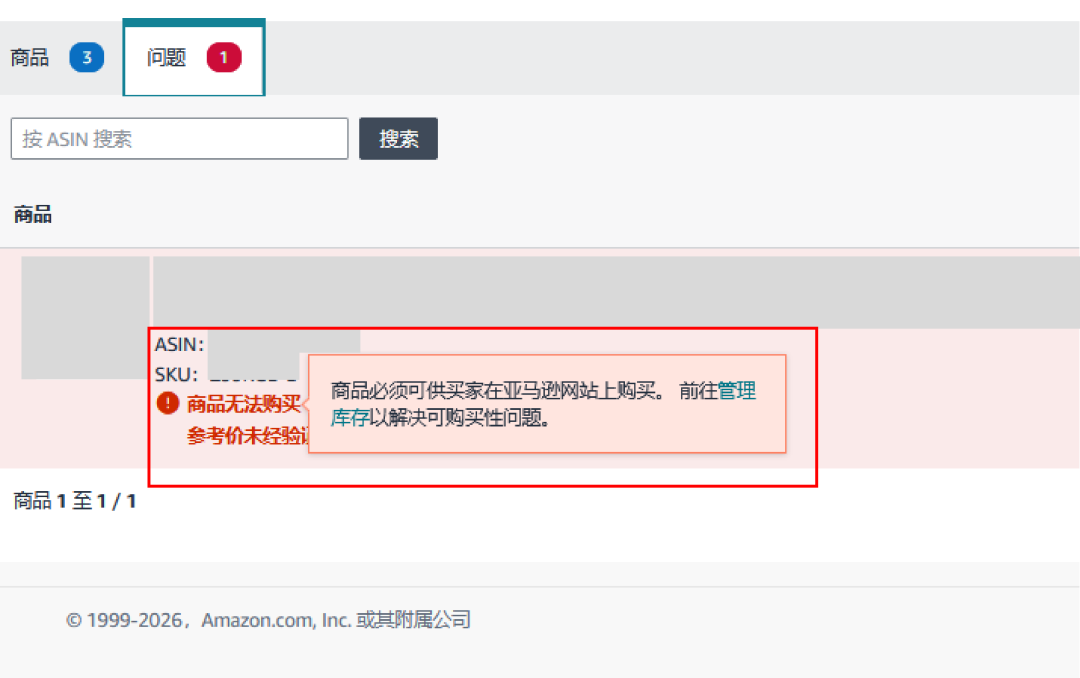
▶When a product status shows “Issues,” click the product, open the detail page, and find the specific problem.
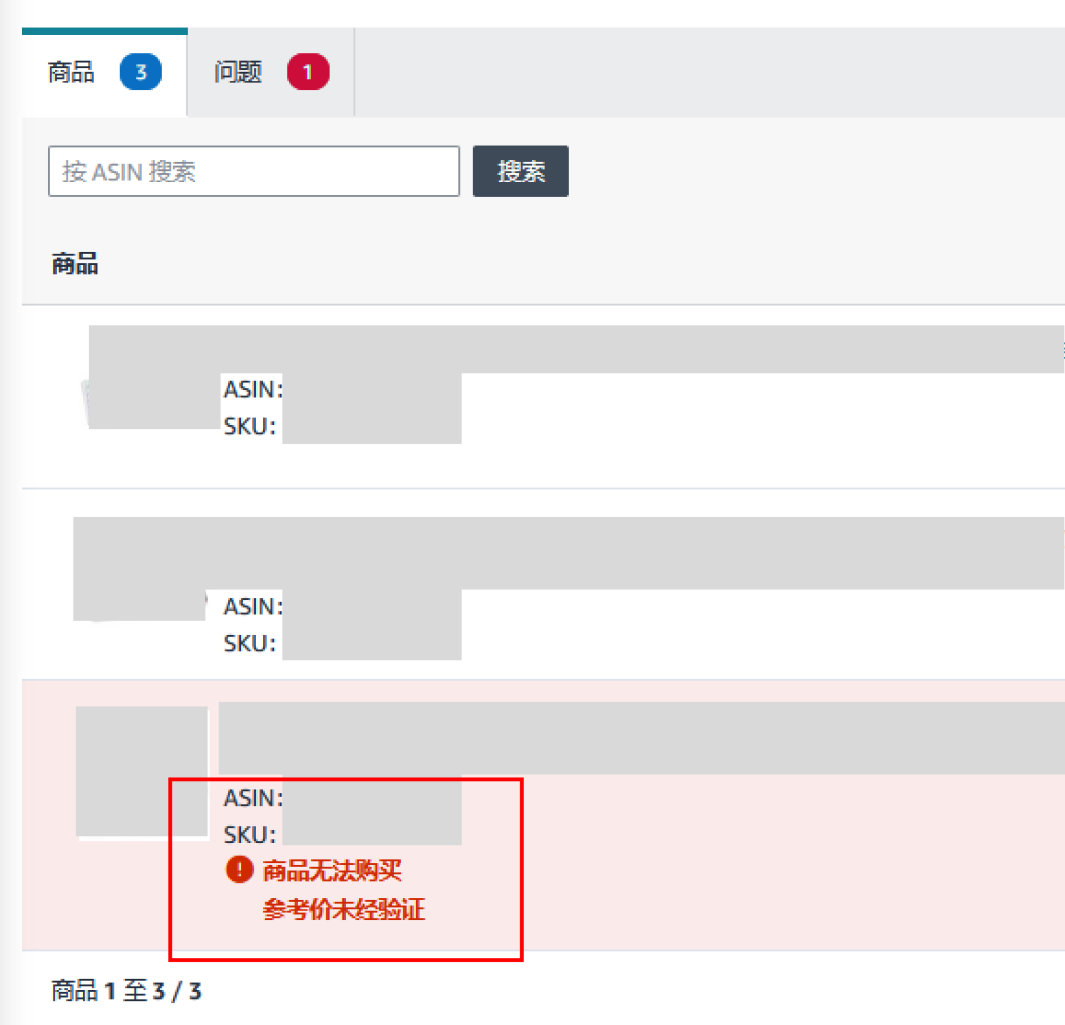
▶Click the specific issue, edit according to the page instructions, and submit.

Besides Lightning Deals/Z Deals, also submit Prime Exclusive Discounts and Coupons for other products so you can flexibly add more offers closer to the event.
▶ Prime Exclusive Discounts
🔗Path: Seller Central → Marketing → Manage Promotions & Deals → Create Promotion → Create Price Discount
◉ When submitting a Prime Exclusive Discount, select “Black Friday & Cyber Monday” in the activity dropdown to get the badge.
◉ Price discounts during the event can promote products, earn badges, and show savings in search results and detail pages.
▶ Coupons
🔗Path: Seller Central → Marketing → Manage Promotions & Deals → Create Promotion → Create Coupon
◉ Set coupon time period to cover the event dates.
As Black Friday/Cyber Monday approaches, focus on five areas: promotion and price health, inventory & logistics, returns prevention, brand building & protection, and advertising.
(1)Promotion & Price Health Optimization
◉ Submit all recommended products before the Deal submission window closes.
◉ Check email notifications for cancellation risks; fix issues immediately.
◉ Use the “Amazon Price & Promotion Planner” to simulate event pricing and manage daily selling prices and promotion price ranges.
◉ Optimize detail pages; combine ads, promotions, and off-site traffic to build interest. Plan off-site promotion early and join Brand Referral Bonus to improve ROI.
◉ Check the “Price Health” dashboard regularly to avoid losing the Buy Box.
(2)Inventory & Logistics
◉ Watch FBA inbound cutoff dates, choose suitable shipping methods, and ship early. Recommended carriers: AGL, Amazon SEND, and FIST to avoid delays/rejections.
◉ Send inventory to AWD—AWD has no capacity limits and products are sellable once inbound. Use AWD auto-replenishment to avoid stockouts; ship via Amazon SEND or AGL to AWD.
◉ If you have not shipped, prioritize air freight; Amazon SEND air is recommended.
◉ Continuously optimize inventory performance and monitor capacity for peak-season sales.
◉ For seller-fulfilled orders, monitor performance metrics, maintain selling privileges, add customer service staffing, or use Amazon CSBA.
◉ Adjust shipping settings to keep delivery promises accurate; use SSA and AHT.
◉ Check the Seller Central Benefits page: new sellers can view FBA inbound benefits; new ASINs can view free storage benefits under FBA New Selection.
(3)Returns Prevention
◉ Analyze return reasons via FBA returns reports and optimize detail pages to reduce peak-season returns.
◉ Enroll in Amazon Product Support, including video support, manufacturer contact, product documents, brand owner live support, and spare parts replacement, to reduce returns.
(4)Advertising
◉ If you submitted Deals, also run Sponsored Ads to help shoppers find your Deals faster:
❶Start campaigns 1–2 weeks earlier to build exposure and improve targeting.
❷Sponsored Products and Sponsored Brands can place Deals on high-visibility search and detail pages.
❸Use suggested bids and automatic targeting to capture holiday search demand without complex manual settings.
◉ 🔍 Ads path: Seller Central → Ads → Campaign Manager
(5)Brand Building & Protection
◉ Optimize your Brand Store and pages to build fans and improve conversion.
◉ Add product videos and shoppable images to your Brand Store homepage; create assets with image generation tools.
◉ Enable the automatic “All Deals” page to centralize promotions and boost exposure.
◉ Use Gen AI A+ for localized copy and run A/B tests with “Manage Your Experiments (MYE)” to choose the best version.
◉ Use Premium A+ pages with video to showcase products.
◉ Check the “Build Your Brand” page in Seller Central before the event to understand brand performance baselines.
Black Friday/Cyber Monday is in the final countdown. Act now: submit, schedule, launch ads, and complete brand safety checks. Best wishes for a strong Black Friday/Cyber Monday!
For any Amazon questions, contact the official customer development manager via link (https://wsurl.cc/wg4chn) or scan the QR code: