
 Amazon Global Store opening
How does Amazon's FBA distribution network achieve same-day or next-day delivery for your products, thereby increasing sales? In this issue, let's talk about what you can do to speed up delivery.
Before diving into today's content, let's do a simple calculation:
How much does delivery speed affect your conversion rate?
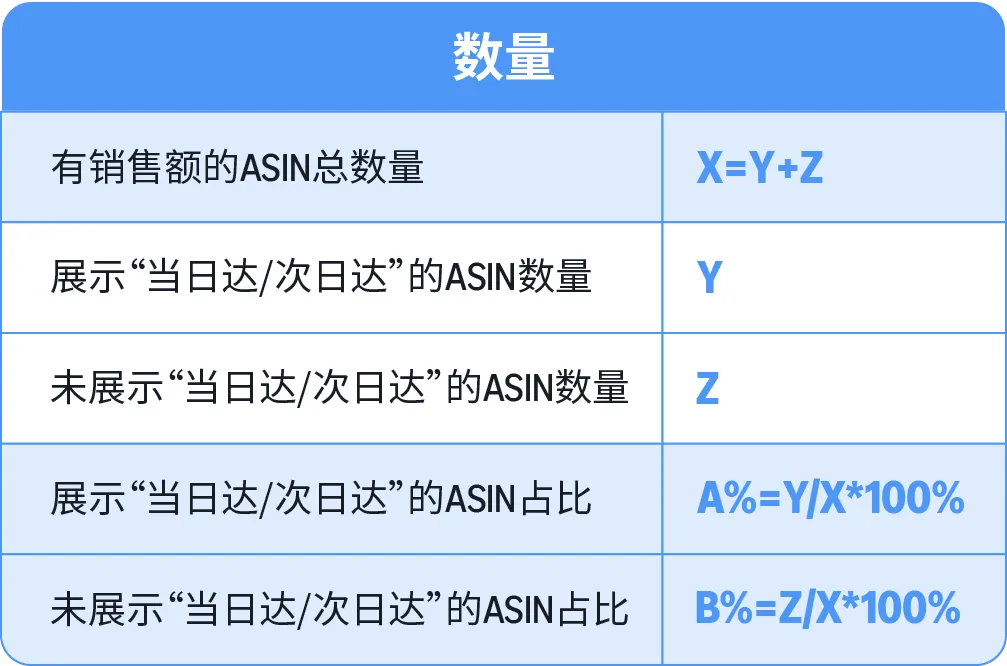
After calculating, you may find that:your best-selling ASINs mostly have same-day or next-day delivery labels. And those top ASINs without labels are your opportunities to speed up—getting them to same-day or next-day delivery can boost sales even more.
Starting today, we officially launch the "Acceleration Plan". Next, we will release a series of content to help you systematically dissect how to increase sales by improving delivery speed.

Research and analysis have found that sellers who perform better in these four areas: inventory levels, replenishment frequency, warehousing methods, and accuracy of delivery tracking details, indeed have better inventory distribution and delivery speed, ultimately achieving an increase in delivery speed.
Next, let's go through these four aspects one by one: why they affect delivery speed, where to check in the backend, what data to look at, and what to do specifically.
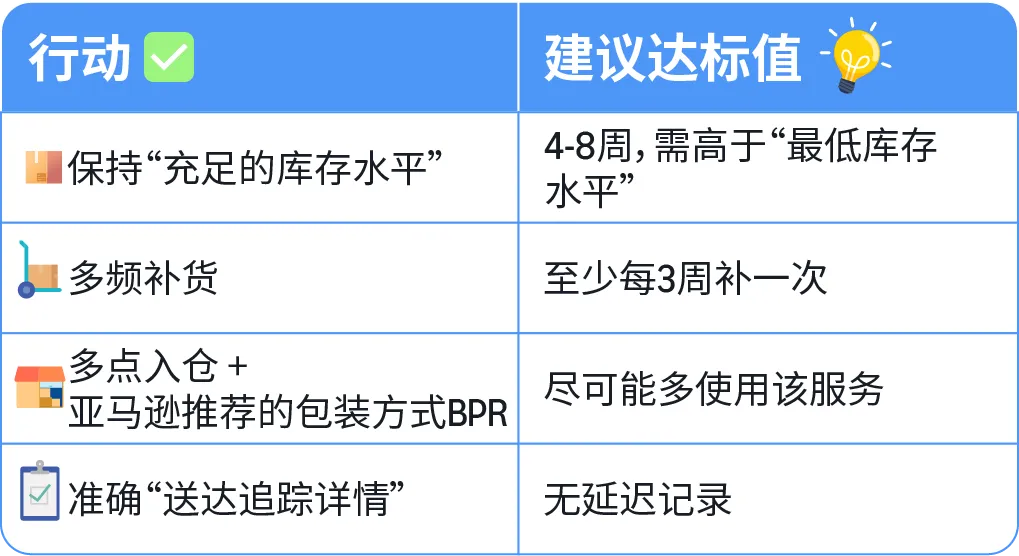
Four-step Quick Reference Table

Why it affects "delivery speed"
Only with sufficient inventory can Amazon's FBA distribute your products to various regional operation centers, allowing more consumers to see "same-day or next-day delivery". Insufficient inventory prevents regionalized warehousing and may trigger low inventory level fees.
Where to look at data
Log in to the seller backend > click on the left menu [Inventory] > select [Amazon Logistics Inventory] > sort by "sales amount", focusing on top ASINs.
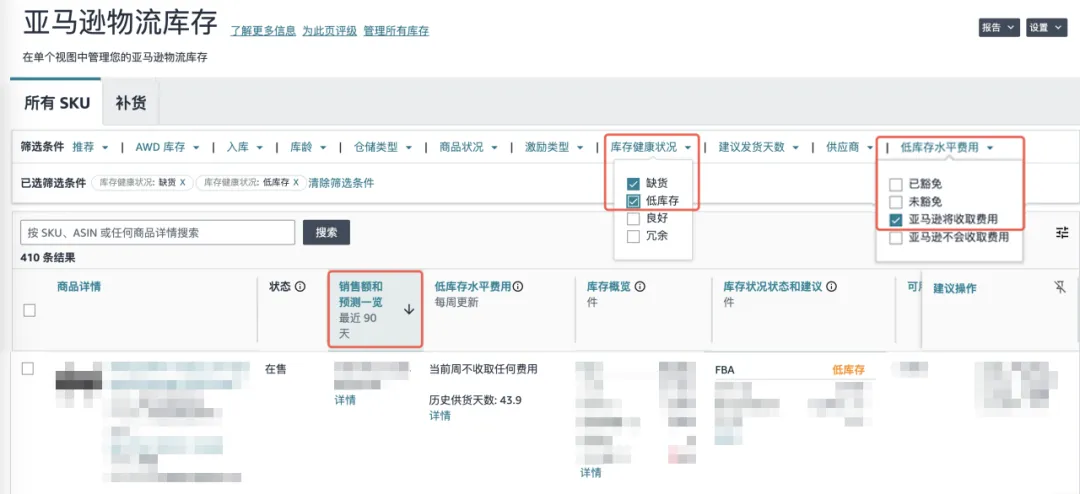
Compare and find problems
◆ Which ASINs are in "out of stock" or "low inventory" status?
◆ Which ASINs will be charged "low inventory level fees"?
◆ Does the [Inventory Status and Recommendations] section show "good"?
Compare these "sub-healthy" ASINs with those that did not show "same-day or next-day delivery" labels previously. Do healthier ASINs have higher conversion rates?
Take action immediately
▲ Core goal: It is recommended to maintain an inventory level of at least 4-8 weeks.
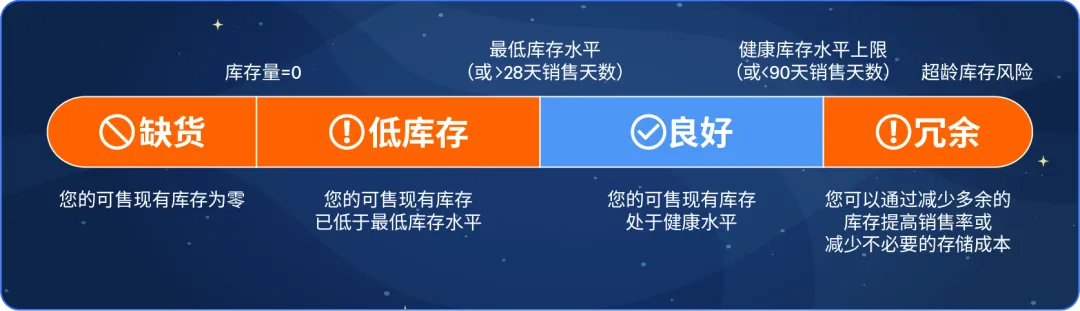
▲ Regularly check: In "Inventory Health", check for "out of stock" and "low inventory" or "low inventory level fees" where "Amazon is about to charge fees", and see which ASINs need replenishment. It is recommended to create shipments according to the following "sufficient inventory levels".
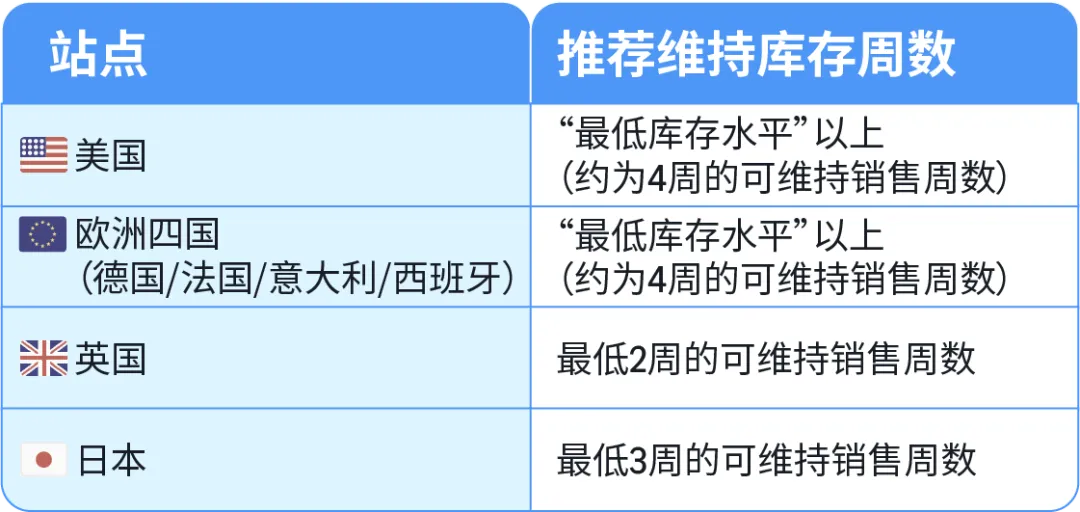
*Note: Different products may have different stocking requirements due to various factors, such as replenishment frequency, first-mile delivery time, seasonality, etc.
▲ Precise settings: On the [Inventory Item Settings] page, you can batch change item settings by uploading an inventory file. You can specify values such as unit cost, supplier lead time, minimum quantity, and supplier name for each item.

Why it affects "delivery speed"
Simply having enough stock is not enough; you also need to replenish frequently. Each time you replenish, Amazon will redistribute your products to warehouses based on the latest consumer demand trends. The more frequent the replenishment, the closer the inventory layout is to the current consumer distribution, and the faster the delivery speed.
What data to look at
Log in to the seller backend > click on the left menu [Inventory] > select [Amazon Logistics Inventory] > select [Replenishment], and check the [Recommended Actions] to see which ASINs need replenishment and the suggested quantity.
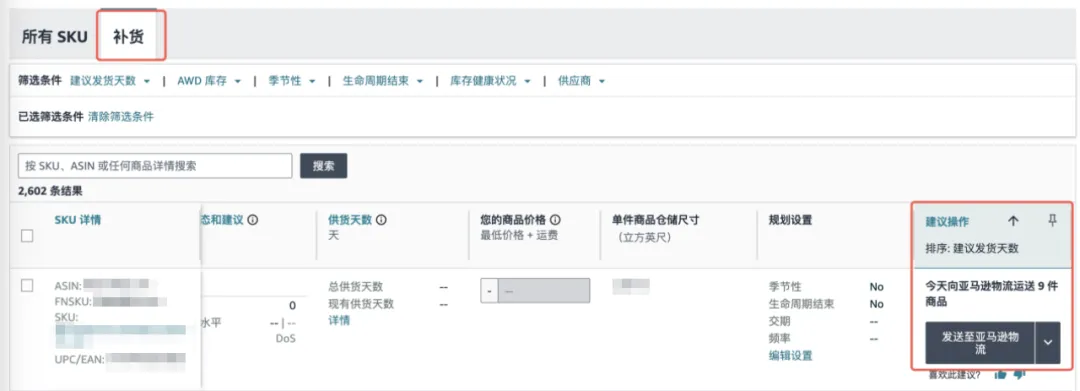
Compare and find problems
◆ Check if those ASINs with low "same-day or next-day delivery" ratios have been repeatedly suggested for replenishment in the past six months?
Take action immediately
▲ Multiple replenishments: For high-sales ASINs (weekly sales of 100+ units), it is recommended to replenish at least every three weeks.
▲ Use tools effectively: Use the [Amazon Logistics Replenishment Tool] to automatically calculate "when to replenish and how much".
▲ Upgrade plan: For products with large demand fluctuations, consider using the [Amazon Warehousing Distribution Network (AWD)] for automatic replenishment to optimize inventory efficiency.

Why it affects "delivery speed"
"Multi-point warehousing" allows shipments to be directly delivered to multiple regional operation centers, bypassing the national distribution center. Pack your shipments according to Amazon's recommended method (BPR), and after arrival, they can skip the unpacking and sorting process and go straight to the distribution center, saving time and effort.
What data to look at
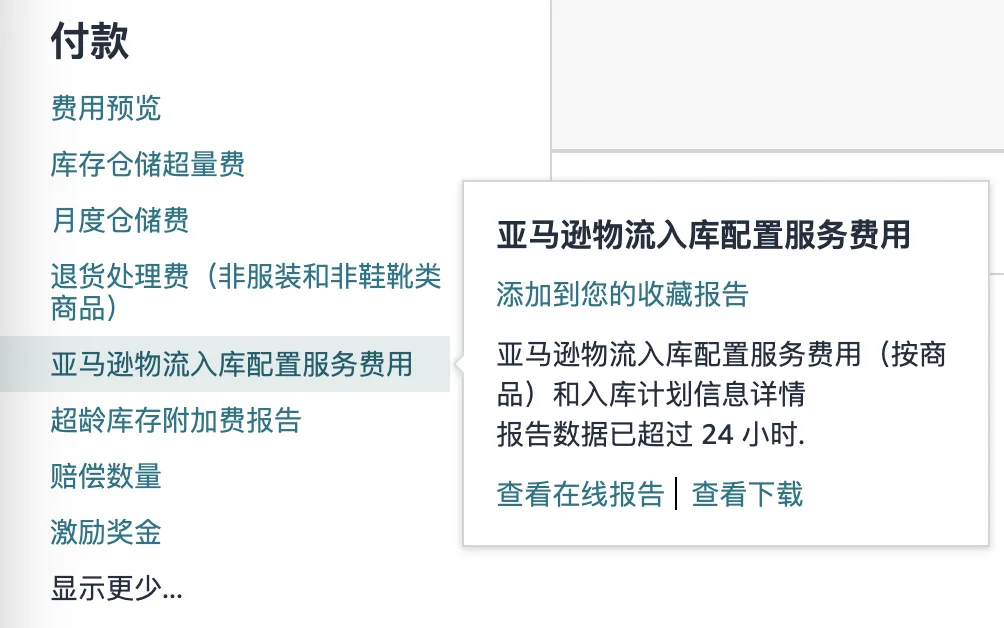
❶ "Multi-point warehousing": Log in to the [Seller Backend] > click on [Reports] > select [Fulfillment] > select [Payments] > open [Amazon Logistics Inbound Configuration Service Fees] and download the relevant report to calculate the "multi-point warehousing" ratio.
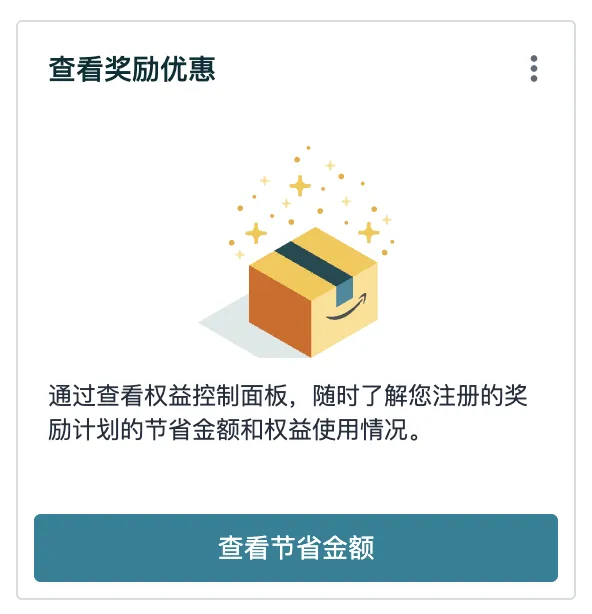
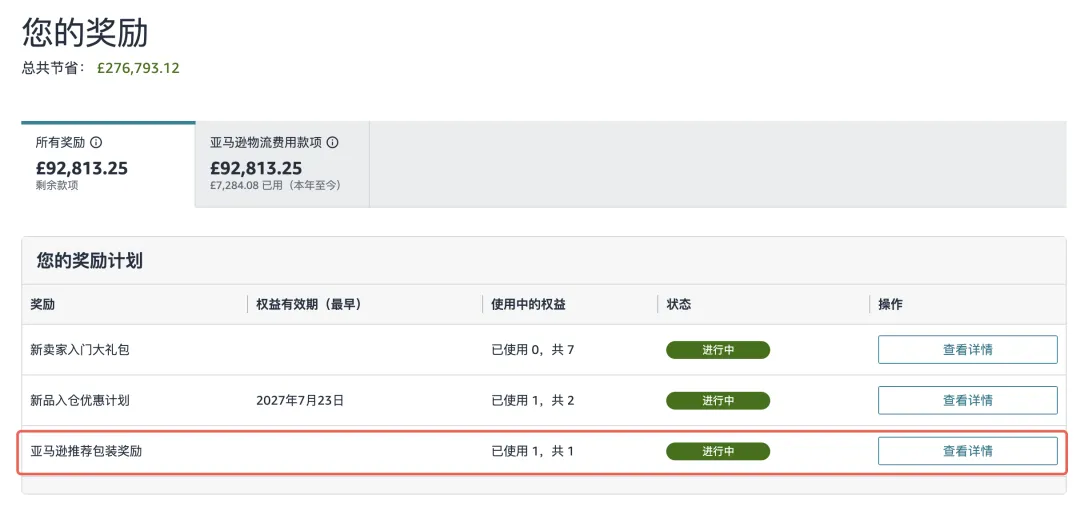
❷ BPR usage: Log in to the [Seller Backend] > find the card [View Rewards and Offers] > check [Rewards] > click [View Details] to see which ASINs get discounts.
Compare and find problems
◆ Compare those ASINs with and without "same-day or next-day delivery" labels, is there a difference in the proportion of "multi-point warehousing"?
◆ How many ASINs use Amazon's recommended packaging method (BPR)?
Take action immediately
▲ Priority choice: Use "multi-point warehousing".
▲ Packaging standards: For single-point warehousing, send at least 5 single-SKU boxes per product; for multi-point warehousing, send at least 500 pieces per product, with no more than 25 pieces per single-SKU box.
▲ Use Amazon's recommended packaging method immediately to improve inbound efficiency and enjoy benefits, with a discount of $0.15 per item on shipping fees.

Why it affects "delivery speed"
Shipments with accurate delivery time slots can get priority scheduling for inbound, allowing operation centers to prepare for receipt in advance, process upon arrival, and get products listed faster. Inaccurate information can lead to scheduling failures, shipment queuing, and inbound delays.
What data to look at
On the [Send to Amazon] > [Shipment Tracking Status] page, check if the delivery time slots and tracking information are accurate.
Compare and find problems
◆ Check if those ASINs with low "same-day or next-day delivery" ratios have shipments showing "receiving delay" or "longer expected processing time" due to information issues?
Take action immediately
▲ Golden rule: When creating shipments, fill in the accurate estimated delivery time slot and update it promptly after shipping.
▲ Dynamic adjustment: The delivery window can be modified before it starts, try to keep the information matching reality.
▲ Prefer Amazon's official logistics or cooperative carriers: Such as AGL, Amazon SEND, FIST, etc., they are deeply integrated with Amazon's system, can automatically synchronize tracking information, giving your shipments priority scheduling for inbound and significantly shortening the listing time.

After completing these four steps, in 1-2 months, recheck the delivery time report, compare the changes before and after optimization for the same batch of top ASINs. Continuously optimize within your controllable range, and you may have the opportunity to make more consumers see the "same-day or next-day delivery" label, thereby driving sales growth.
If you have any questions about Amazon, you canuse the link ( https://wsurl.cc/wg4chn) or scan the codeto contact the official customer development manager: