
 Amazon Global Store opening
An after-sales issue: support can't explain it clearly and the customer doesn't understand—so it ends in a return.
Amazon Brand Integration aims to solve this: let brand support talk directly with customers in real time and stop returns before they happen.
Now, Brand Integration has rolled out five upgrades to make after-sales support stronger.

Brand Integration is a free feature under Amazon Product Support.
Once enrolled, customers with post-purchase issues can reach brand support from Amazon with one click (phone or chat), and the brand's own team answers in real time.
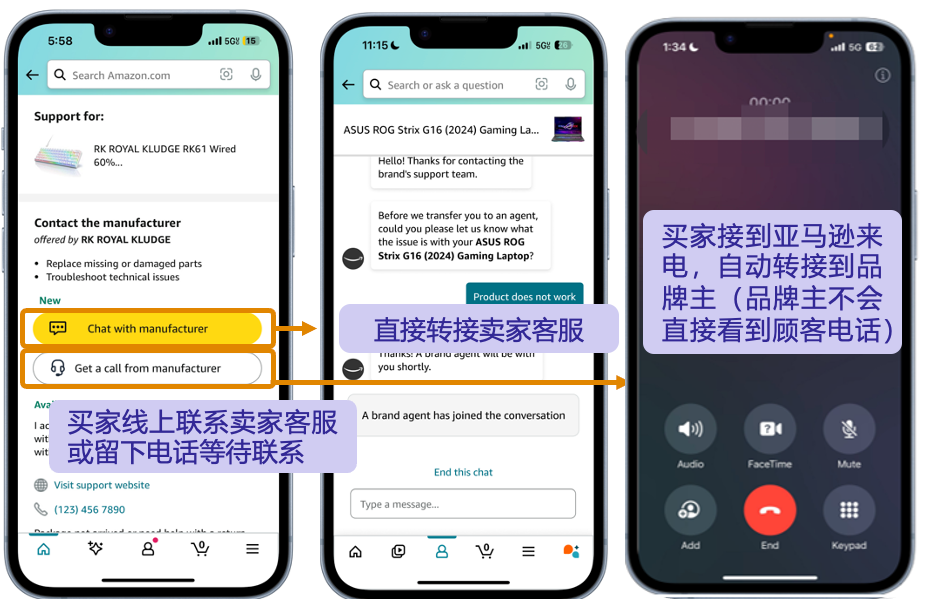

2025 data shows1:
❶About 58% of customers who contacted support through Brand Integration did not return items1.
❷In other words, about 6 out of 10 customers who want to return or are confused can be retained.

❶Brands enrolled in Amazon Brand Registry
❷Products fulfilled via FBA
❸ Sites: US, Canada, UK, Germany, France, Italy, Spain, Sweden, Belgium, Netherlands, Poland
❹ Available phone number countries/regions:
North America: only US or Canada country codes.
Europe: only UK, Italy, France, US, Germany, Spain, Sweden, Belgium, Netherlands, Poland country codes.

❶Sign in to Seller Central → open the Product Support page:
❷On the Brand Integration card, click Learn More and Enroll → Submit an Enrollment Form
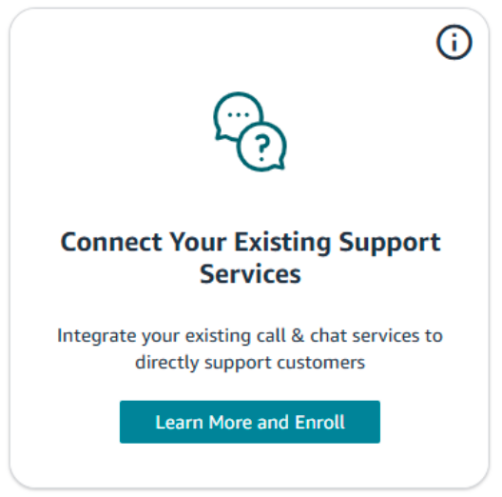
❸Submit the form as prompted. Amazon will review it within 15 business days.

❹After approval, voice support is enabled immediately. Once brand agents have Amazon Connect access, the Product Support team enables chat.
💡Tip
Submit the complete form in one go; incomplete forms will be rejected. Support hours can be set as one continuous block only—if you have multiple shifts, use the full outer time range. Agents control Online/Offline status in Amazon Connect.


When a customer says “that button doesn't respond,” I don't know which button they mean. After a dozen typed exchanges, it's still unclear.
◉ What’s new
Both customers and agents can send images, photos and files in chat, up to 100MB per file. Customers can share a close-up, a short video or an order screenshot; agents can send diagrams, installation guides and troubleshooting docs—chat is no longer text-only.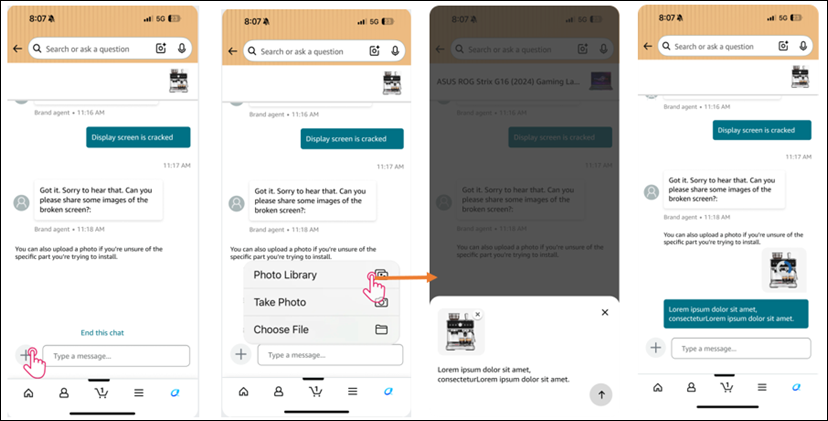
▲ Customer-side image sharing
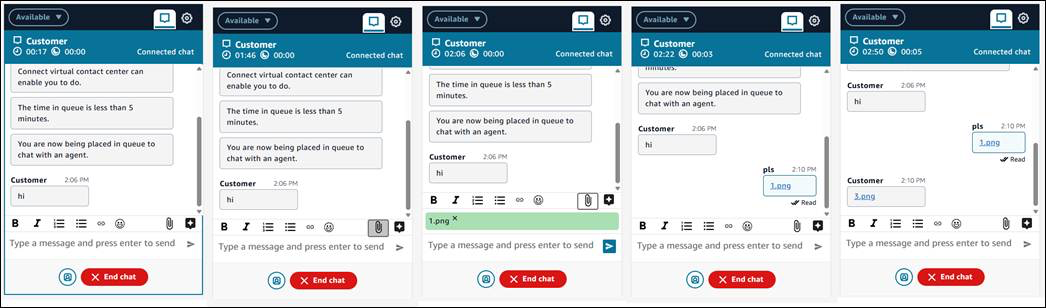
▲ Seller-side Amazon Connect attachment upload

A customer returns the next day about the same item, and you have to start over—what was said, what was tried, whether it was resolved: no idea.
◉ What’s new
Full chat history is kept for both sides. When a customer reopens chat, both parties can see the previous conversation—agents can pick up where it left off, and any team member can view it.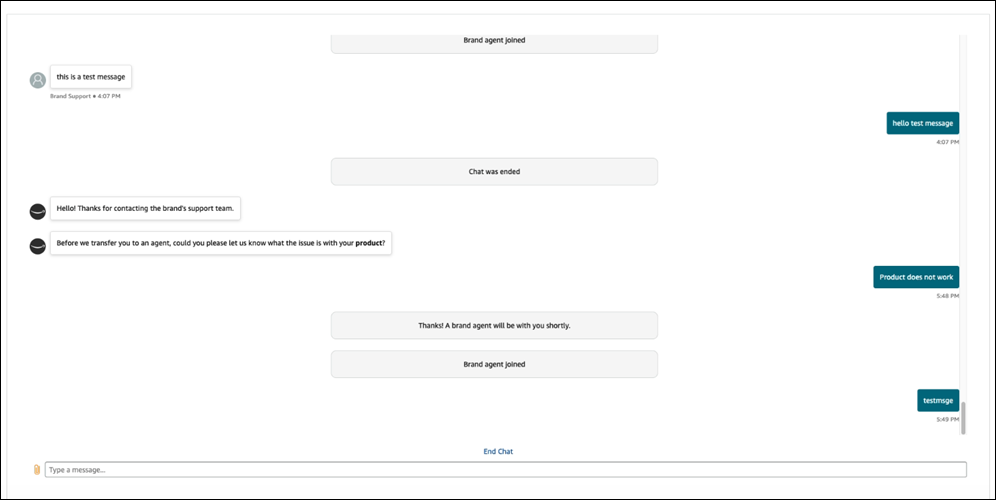
▲ Seller-side chat history

Not enough agents; during busy times they can't keep up. In peak season, customers wait in queues.
◉ What’s new
Each brand can register up to10 agents for simultaneous chat support—more than double the previous limit.
◉ How to scale up
If your team is already live, contact the Product Support team to request more seats.

In peak season, agents are maxed out as soon as they start. Customers wait in long queues, and many give up and return items.
◉ What’s new
Per-agent concurrent chat limit raised to10. The same headcount can serve more customers at once, easing queue pressure.

Agents are busy in other windows and don't hear a new chat—by the time they notice, the customer has been waiting for minutes.
◉ What’s new
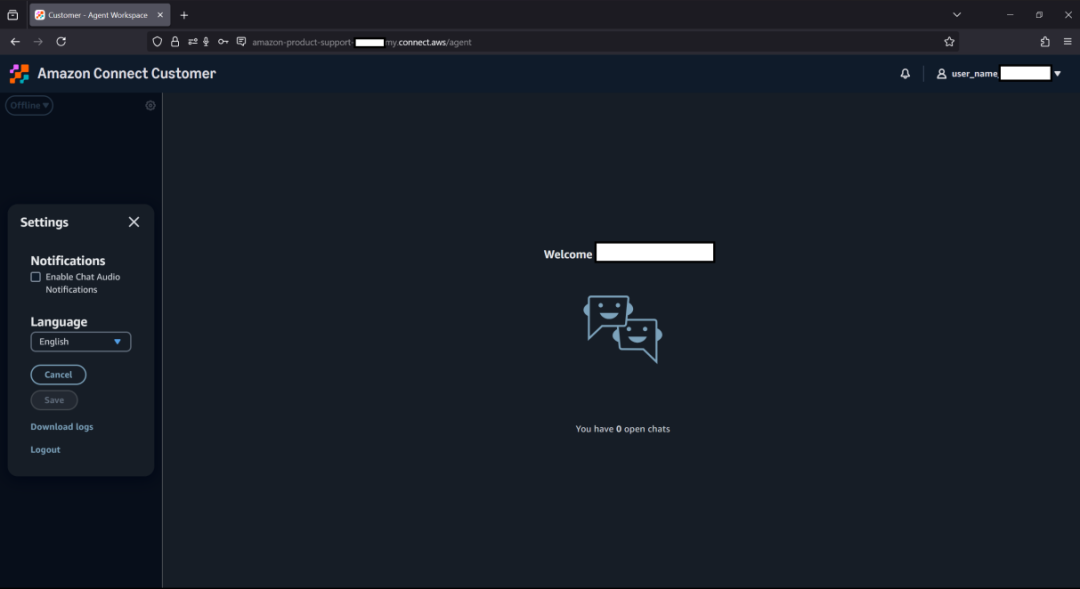
In Amazon Connect's Contact Control Panel (CCP), you can enable chat audio notification—a ring for new messages so no chat is missed.
◉ How to enable
❶Open Settings (⚙️) in the top right of CCP.
❷In the settings menu, find Notifications.
❸Check ☐ “Enable Chat Audio Notifications”.
❹Click Save. Hearing a confirmation sound means it's enabled.
💡Tip
If you don't hear a sound after saving, check whether your browser blocked autoplay for Amazon Connect—allow it.

Together, these five upgrades make Brand Integration stronger and more effective:
❶ Scale to handle demand: up to 10 agents and 10 concurrent chats per agent, increasing capacity for peak season.
❷ No missed chats: audio alerts ensure new messages aren't ignored.
❸ Clear communication: image and file sharing reduces back-and-forth typing time.
❹ Continuity: chat history is kept, so follow-up inquiries don't start from zero.
◉ Brand Integration is only 1 of 5 Product Support features
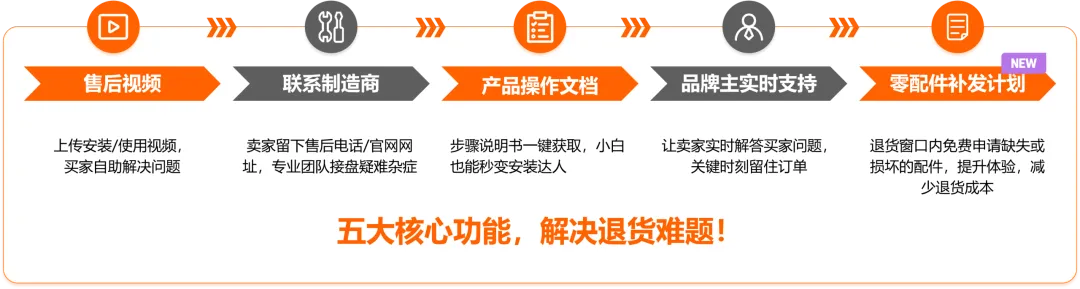
If you haven't heard of Amazon Product Support, it's Amazon's free “return prevention” toolkit for sellers—
It includes 5 features, each can be enrolled separately:
▶️ Three key numbers
❶ In 2025, over 1.3 million sellers enrolled in Product Support2
❷ In 2025, over 16 million customers solved issues through Product Support and avoided returns3
❸ Top sellers saw returns drop by 40%4
How to enroll
Amazon has consolidated all five features into one portal. Sign in to Seller Central and enroll once—it's free for all sellers, new or existing.
After-sales is not the “last step”—it's a chance to save orders and win repeat purchases.
How do you currently handle after-sales issues? Share in the comments!
For any Amazon questions, contact the official customer development manager via the link ( https://wsurl.cc/wg4chn) or scan the QR code: